
One weak signal bar can turn a simple phone call into a stressful moment. That is exactly where wifi calling earns its keep: on supported phones and carriers, it lets you make or receive calls over Wi-Fi when cellular coverage is poor.
For people who live in concrete buildings, deal with patchy indoor coverage, or work in offices where signals mysteriously vanish near the elevator, this setting can feel less like a hidden feature and more like a rescue switch. Better yet, Apple and Google both keep the setup simple, though Android menus can vary by device.
Before you start, connect to a stable Wi-Fi network and be ready to confirm an emergency address if your phone asks for one. That extra step matters for emergency services.
What Is wifi calling and How Does It Work?
In plain English, this feature gives your phone another route for voice calls. Instead of leaning only on a nearby cell tower, your device can use an internet connection over Wi-Fi when that provides a better path. Apple says it works in places with little or no cellular coverage, and Google explains that calls can be placed over Wi-Fi once the feature is turned on.
That does not mean every call will always stay on Wi-Fi. Phones and carriers may switch between networks based on signal quality. On Android, Google explicitly notes that settings and features can differ by device, so the wording on your screen may not match a friend’s phone exactly.
| Device | Usual path | What to expect |
|---|---|---|
| iPhone | Settings > Cellular/Mobile Service > Wi-Fi Calling | You may need to confirm an emergency address |
| Android | Phone app or Settings > Calls/Network > Wi-Fi Calling | Menu names vary by brand and carrier |
These menu paths reflect Apple’s and Google’s official guidance, and Android wording can vary by phone maker and carrier.
How to Enable wifi calling on iPhone
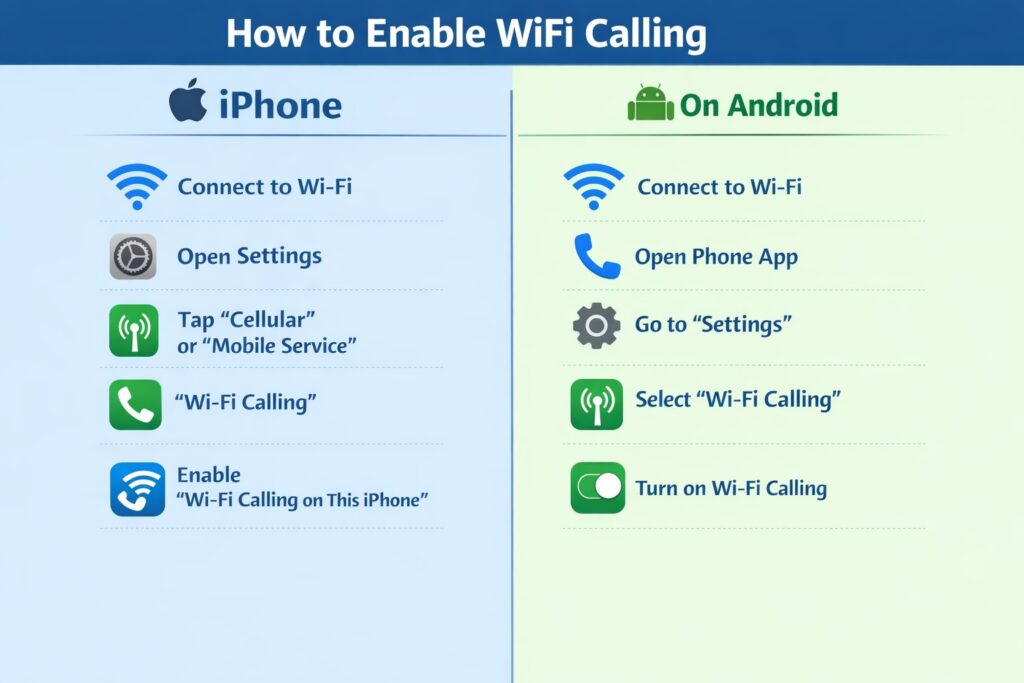
Apple keeps the process straightforward. Open Settings, tap Cellular or Mobile Service, choose a line if you use Dual SIM, then open Wi-Fi Calling and switch it on. Apple also notes that you may need to enter or confirm your emergency address.
Steps to follow:
- Connect your iPhone to Wi-Fi.
- Open Settings.
- Tap Cellular or Mobile Service.
- Choose your SIM line if needed.
- Tap Wi-Fi Calling.
- Turn on Wi-Fi Calling on This iPhone.
- Confirm your emergency address if prompted.
If the switch is missing, do not assume something is broken. Carrier support still matters, and Apple’s support pages make that clear.
Image: iPhone settings screen with the Wi-Fi Calling toggle highlighted.
How to Enable wifi calling on Android Phone
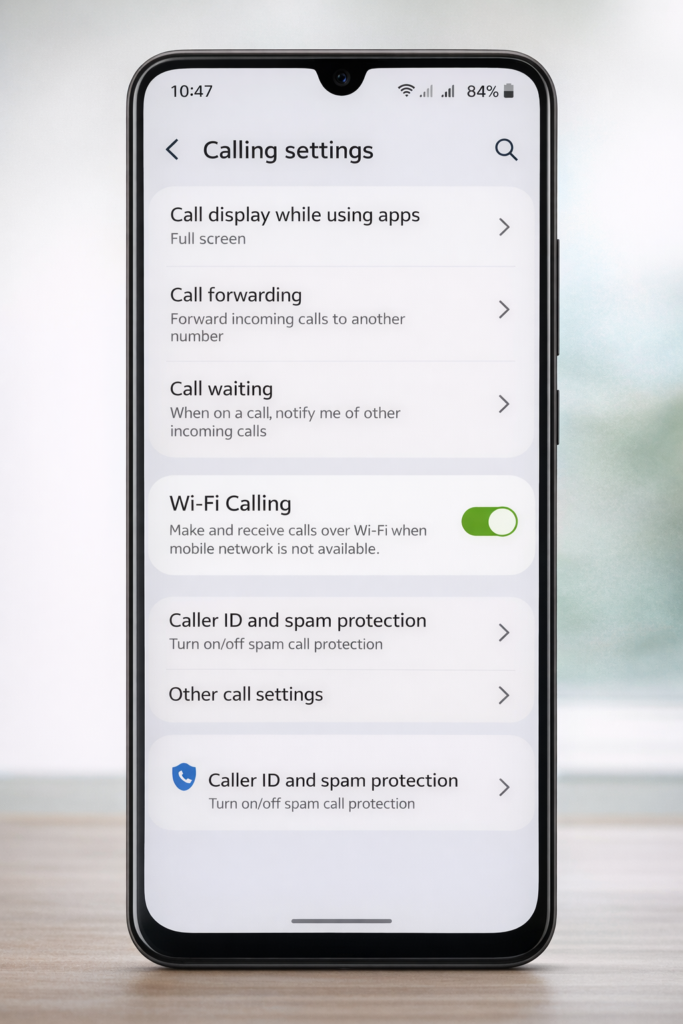
Android is slightly messier, but the idea is the same. Google’s official help says settings can vary by device, which means a Pixel, Samsung, or Xiaomi phone may hide the option in different menus. Usually, you will find it inside the Phone app settings or under network settings.
Try this path first:
- Connect the phone to Wi-Fi.
- Open the Phone app.
- Tap the menu icon, then Settings.
- Look for Calls, Calling accounts, or Wi-Fi Calling.
- Turn the feature on.
If that does not work, open the main Settings app and search for the term directly. Google notes that, once enabled, you can place calls over Wi-Fi like any other call, and some devices show “Internet Call” or “Wi-Fi calling” on screen.
A simple real-life example: imagine a student in a dorm where mobile service is overloaded but campus Wi-Fi is strong. In that case, wifi calling can make the phone feel reliable again.
When It Helps Most
This setting shines in basements, rural homes, hotel rooms, office towers, and buildings with thick walls. In places where the internet is stable but the cell signal is weak, it can improve call reliability without changing your number or pushing you into a third-party app.
There is one detail people should not skip: emergency setup. The FCC highlights the importance of 911 and E911 capability, and Apple may ask you to register an address during activation. Keep that information current.
Common Problems and Fixes
Most issues come down to three things: support, settings, or signal quality.
The option is missing
Usually, the carrier or plan does not support it on that line. Start by checking carrier support. Apple notes that availability depends on carrier support and region.
Calls sound bad or drop
A weak Wi-Fi network is often the real problem. Move closer to the router, restart it, or test a different network. Apple even recommends trying another Wi-Fi network during troubleshooting.
Your phone prefers cellular
That can be normal. Some setups automatically use whichever connection offers the better call experience at that moment.
Conclusion
A weak signal does not have to ruin an important call. Once you turn on wifi calling, your phone has a second path for staying connected, and that small change can make everyday communication far less frustrating. Whether you use an iPhone or an Android phone, the setup is usually quick, and the payoff shows up exactly where it matters most: the places your mobile signal lets you down.
Also Read: How 6GHz Wi-Fi Solves Common Home Network Problems
FAQ
Is wifi calling free?
Often, it is billed like a regular voice call, but pricing and international rules depend on your carrier and plan.
Does it need a separate app?
No. Apple and Google describe it as a built-in feature on supported devices.
Why can’t I find wifi calling on my phone?
The option may be hidden by device model, software version, regional limits, or carrier restrictions. Android menus also vary widely.
Is it better than normal cellular calling?
It is better when your mobile signal is weak and your Wi-Fi is strong. If the Wi-Fi network is unstable, cellular may still sound better.
Can I use it for emergency calls?
Supported devices and carriers can route emergency calls, but accurate address details matter. That is why setup may ask for an emergency address.
Does airplane mode affect it?
Sometimes. Google Fi’s help shows Wi-Fi-based calling can still work in certain setups, but behavior depends on the carrier and configuration.
