
ChatGPT is an AI assistant that helps people write, research, analyze files, solve problems, and plan work through natural conversation. The real question is not what it can do; the question is when it deserves your trust. This guide gives you a practical workflow test, clear risk rules, and a sharper way to use the tool without treating every answer as finished work for serious decisions and publishing across teams.
Start With the Job, Not the Tool
Most weak guides begin with a definition. That does not help a busy user decide what to do next.
A better starting point is the job. Are you trying to draft faster, understand a topic, compare options, inspect a document, or make a decision that affects money, health, law, or reputation?
The assistant is strongest when the task has three traits: the work is repeatable, the output can be checked, and the cost of a mistake is low. It is weakest when the task requires current facts, private data, local regulation, or professional accountability.
Use it as a drafting and reasoning partner. Never treat its responses as a proxy for verified facts.
The Four-Box Workflow Test
Before you ask for an answer, score the task against four checks: repeatability, risk, verification, and data sensitivity.
| Workflow Question | Low-Risk Answer | High-Risk Warning |
|---|---|---|
| Is the task repeatable? | Email drafts, summaries, outlines | One-off legal or financial judgment |
| Can you verify the output? | Sources, calculations, visible files | Claims with no evidence trail |
| What happens if it is wrong? | Minor edit needed | Money, safety, compliance, or trust damage |
| Does it require private data? | Public notes or anonymized examples | Client files, passwords, contracts, medical records |
If the task fails two or more boxes, slow down. Use the model for structure only, then verify with a trusted source or qualified expert.
Where It Performs Best
The tool performs well on messy early-stage work. Give it scattered notes, meeting points, rough bullet ideas, or a half-finished outline, and ask for structure.
It is also strong at translation between formats. The model excels at transforming sprawling project briefs into structured task lists, translating intricate regulatory text into accessible prose, and condensing tabular data into clear executive summaries.
The best use cases are practical: first drafts, checklists, SOPs, content briefs, internal emails, comparison tables, study plans, and code explanations.
Where It Breaks Down
The model can sound confident while being wrong. This is the main danger.
It may invent a source, miss a policy change, misunderstand a chart, or apply general advice to a local situation where the rule is different. In real estate, that could mean misstating a tax point, buyer document, zoning issue, or financing condition.
In technical work, it may produce code that looks clean but fails under edge cases. In marketing, it may write smooth copy that says nothing original.
The Better Prompt Method
Do not start with “write an article” or “explain this.” Start with a controlled brief.
Use this prompt pattern:
Role: Act as a [specific expert].
Task: Create [exact output].
Audience: This is for [reader type].
Context: Use these facts only: [details].
Standard: The answer must be [clear, practical, sourced, concise].
Risk: Flag anything uncertain instead of guessing.
Output: Use [format].
This forces the assistant to work inside boundaries. It also makes weak answers easier to detect.
For example, a real estate prompt should include city, buyer type, property category, budget range, and legal caution. A technical prompt should include stack, error message, expected behavior, and what has already been tested.
A Practical Example: Real Estate Content
A generic request produces generic copy.
Weak prompt: “Write a blog about buying property.”
Stronger prompt: “Create a buyer checklist for salaried first-time apartment buyers in Lahore. Focus on document verification, location risk, payment schedule, possession timeline, and questions to ask before token money. Use plain language and flag legal checks that require a professional.”
That prompt creates a more useful answer because it reflects the reader’s real problem. It also gives the article a chance to show experience, not just definitions.
For SEO, this matters. Search engines can already summarize basic facts. To stand out, your article must provide firsthand operational breakdowns, regional market insights, concrete case studies, and clear, executable steps.
How to Check the Output
Use a three-pass review.
First, check accuracy. Are dates, names, laws, prices, and technical claims verifiable?
Second, check usefulness. Does the answer tell the reader what to do next, or does it only explain the topic?
Third, check originality. Remove filler, generic claims, repeated phrases, and any line that could appear on a thousand other websites.
Privacy and Data Rules
Do not paste sensitive material by habit. That includes passwords, private keys, financial files, medical records, confidential contracts, unpublished client data, and internal strategy documents.
Use anonymized examples when possible. Replace names, account numbers, addresses, and deal values with placeholders.
For business use, create a written rule: what teams may enter, what they must redact, and what must stay outside the system.
Memory and project features can improve continuity, but they also require discipline. Save only what helps future work. Keep sensitive details out unless your organization has approved the process.
Cost, Access, and Upgrade Logic
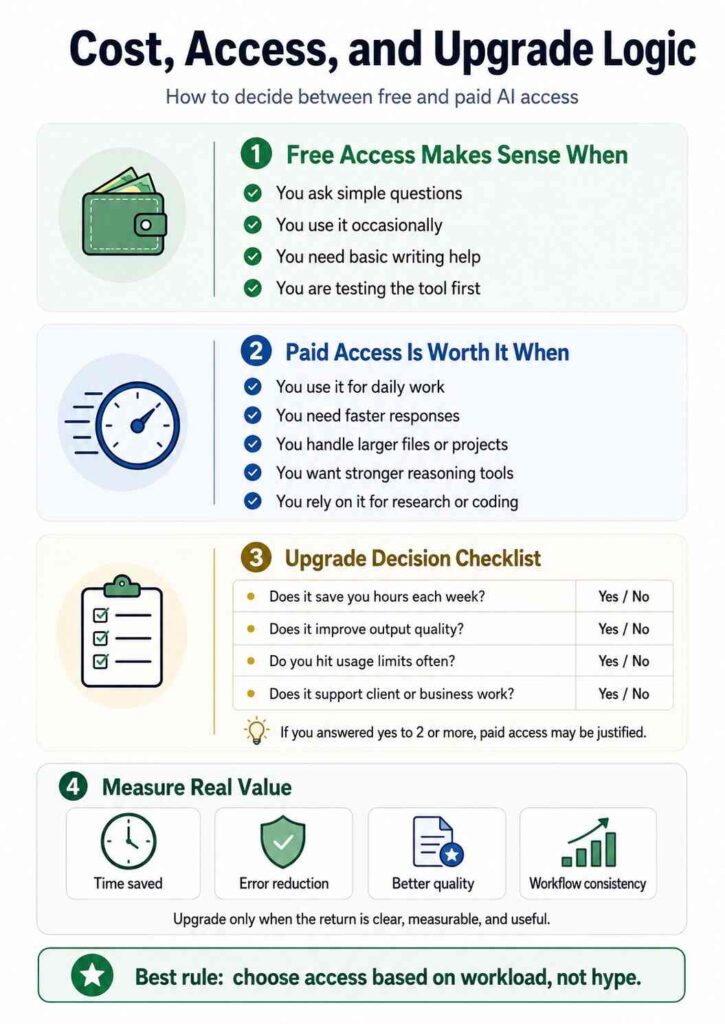
The free version can handle many everyday tasks. Paid access makes sense only when the tool saves enough time or supports serious work.
Upgrade for higher usage, stronger reasoning, larger files, better workflow continuity, or business controls.
Measure value in hours saved, error reduction, and output quality. If you use it twice a month for simple questions, free access may be enough. If it supports daily client work, research, coding, or document review, paid access is easier to justify.
Also Read: OpenAI Windsurf Acquisition: What Developers Need to Know
The Final Rule for Serious Users
The strongest users do not ask the model to “do everything.” They divide the work.
Let it draft, structure, compare, simplify, and challenge ideas. Keep ownership of judgment, verification, strategy, and final approval.
Final Takeaway
ChatGPT is most useful when you treat it as controlled leverage, not automatic expertise. Give it narrow tasks, protect private data, verify important claims, and add real-world judgment before publishing or acting. The winners will not be the people who generate the most text. They will be the people who turn assisted work into clearer, safer, more useful decisions consistently.
FAQs
Can this assistant replace a specialist?
No. It can support a specialist by drafting, organizing, and checking ideas, but accountability stays with the human expert.
How do I make answers less generic?
Give real context, constraints, examples, audience details, and a clear standard for quality. Then edit the output hard.
Is it safe for client work?
Only with redaction, approved settings, and clear internal rules. Do not enter confidential data casually.
What is the biggest mistake beginners make?
They accept the first answer. Better users question, refine, verify, and remove vague language.
Can it help SEO content rank?
It can help with research structure and drafting. Ranking still depends on experience, originality, helpfulness, topical depth, and editorial control.
