

Cloud computing is the use of servers, storage, software, databases, and processing power over the internet instead of owning hardware. It helps businesses run systems with more flexibility and lower upfront infrastructure.
- Cloud Computing Explained in Simple Terms
- How Cloud Computing Works
- Main Types of Cloud Computing Services
- Serverless Computing
- Cloud Deployment Models
- Key Benefits of Cloud Computing
- Cloud Computing vs Traditional IT
- Is Cloud Computing Secure?
- Critical Scenarios Where Cloud Computing Fails
- Should You Use Cloud Computing in 2026?
- How to Choose the Right Cloud Computing Services
- Final Takeaway: What Cloud Computing Really Means
- FAQs
Cloud Computing Explained in Simple Terms
Cloud computing explained simply means using technology capacity when you need it, without building the setup in your office or data center.
A business using Microsoft 365, Dropbox, Salesforce, AWS, Azure, or Google Cloud is already using cloud computing. The model works because companies need tools that move with demand.
The key point is responsibility. The provider manages part of the stack, while the business owns data, access rules, costs, and decisions.
How Cloud Computing Works
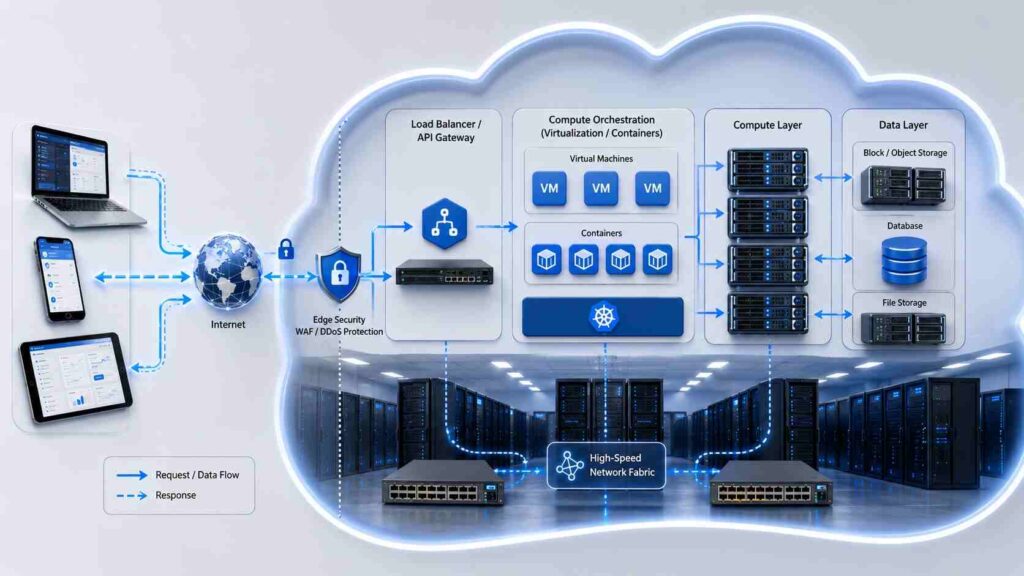
Cloud computing works through provider-owned data centers filled with servers, storage, networking, and security controls. When you open an app, upload a file, run a report, or visit a website, your request is handled by remote systems.
You usually see a login screen, dashboard, app, API, or browser window. Behind it, cloud platforms assign computing power, move data, and apply permissions.
Virtualization divides physical hardware into flexible digital environments, so many workloads can run securely on shared infrastructure.
The business value is speed. Instead of waiting for hardware approval and installation, a team can launch a server, database, or storage space in minutes.
Main Types of Cloud Computing Services
Cloud computing offerings are fundamentally categorized into three core pillars: IaaS, PaaS, and SaaS. Each model decides how much the provider manages and how much you manage.
Infrastructure as a Service (IaaS) gives you virtual servers, storage, and networking. It suits teams that want control without buying machines.
Platform as a Service (PaaS) gives developers a managed environment to build and deploy applications. It removes much of the server maintenance work.
Software as a Service (SaaS) is ready-to-use software delivered online. Email, accounting, CRM, and HR tools often use this model.
Serverless Computing
Serverless computing does not mean there are no servers. It means your team does not manage them directly.
Code runs when an event happens, such as a payment, file upload, or form submission. For uneven workloads, serverless can reduce waste.
Cloud Deployment Models
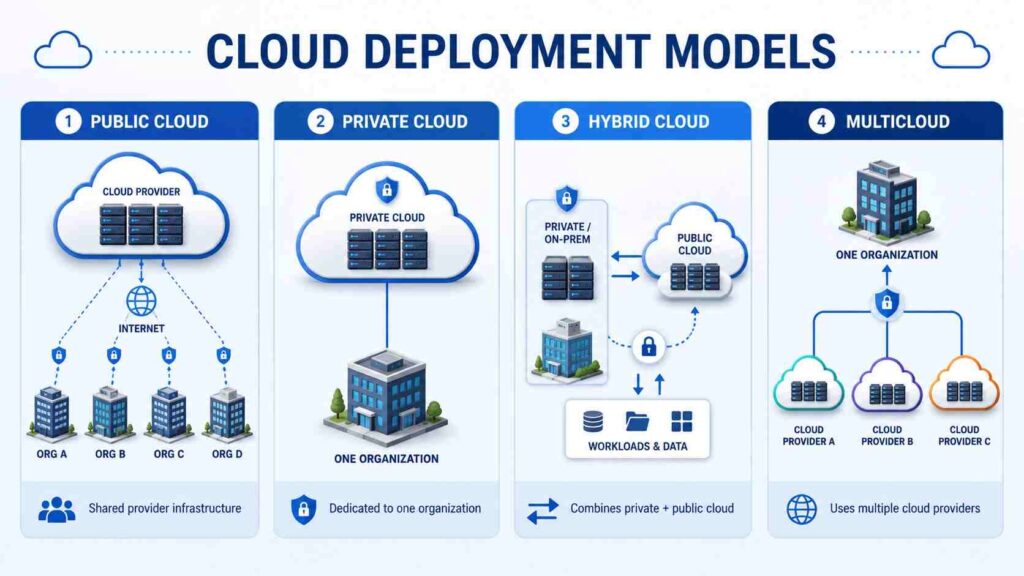
A public cloud uses provider-owned infrastructure shared across many customers, with each customer’s systems separated.
A private cloud is dedicated to one organization. It offers more control, but usually requires higher cost and oversight.
A hybrid cloud combines public and private environments. A multicloud approach uses more than one provider.
Key Benefits of Cloud Computing
The first benefit is speed. Teams can test ideas, launch tools, and expand capacity without waiting for a full hardware cycle.
The second is flexibility. If an ecommerce store gets heavy sale traffic, cloud resources can scale. If demand drops, resources can be reduced.
Cost is a benefit only when managed properly. Cloud computing can reduce upfront spending, but careless usage creates waste. Unused servers, duplicate storage, and poor monitoring cause expensive surprises.
Cloud computing also supports remote work. Approved users can access files, systems, and applications from different locations.
Backup and disaster recovery are stronger when designed well. Data can be copied across locations to improve recovery.
Cloud Computing vs Traditional IT
Traditional IT is built around ownership. Cloud computing is built around access.
| Area | Traditional IT | Cloud Computing |
|---|---|---|
| Cost | High upfront hardware spend | Usage-based billing |
| Setup | Slower procurement | Faster deployment |
| Scaling | Limited by hardware | Flexible capacity |
| Maintenance | Mostly internal | Shared with provider |
| Access | Office or VPN based | Internet-based access |
A stable internal system with predictable demand may not need immediate migration. A growing customer-facing platform, analytics workload, or remote team usually benefits faster from the cloud.
Is Cloud Computing Secure?
Cloud computing can be secure, but it is not secure by default. That distinction matters.
Major providers invest in physical security, network protection, encryption, monitoring, and resilience. But a provider cannot fix weak passwords, careless permissions, exposed storage, or poor internal policies.
This is the shared responsibility model. The provider protects the cloud infrastructure. The customer protects the data, identities, configurations, and applications placed inside it.
In practical terms, businesses need multi-factor authentication, least-privilege access, encryption, backups, logging, and regular reviews.
Critical Scenarios Where Cloud Computing Fails
Cloud computing is not the right answer for every workload. Moving a poorly managed system to the cloud usually creates a more expensive poorly managed system.
It may not be ideal when demand is stable, hardware is already paid for, or latency requirements are strict. It can also be difficult with strict data residency rules or unreliable internet access.
Vendor lock-in is another serious issue. Once a business builds heavily around one provider’s tools, leaving that platform can become slow, costly, and disruptive.
Should You Use Cloud Computing in 2026?
Use cloud computing when it improves speed, resilience, access, scalability, or technical capability. Do not use it just because it sounds modern.
A sensible decision starts with the workload. What problem are you solving? Who needs access? What uptime matters? What happens if the service fails?
For startups, cloud computing usually reduces friction. For small businesses, SaaS tools often deliver the fastest return. For enterprises, governance and cost control matter as much as performance.
For AI and data-heavy workloads, cloud platforms offer serious advantages. The mistake is assuming power is strategy. Strong governance decides whether the investment pays off.
Also Read: Cloud Storage Alternatives: 15 Best Free & Paid 2026
How to Choose the Right Cloud Computing Services
Choose cloud computing services by business need, not by brand popularity. A backup system, website, finance application, AI model, and CRM platform should not be evaluated the same way.
Review pricing beyond the headline rate. Compute, storage, data transfer, backups, support, monitoring, and compliance can all affect the final cost.
Check uptime history, security features, data location, support quality, integration options, and exit terms. If you cannot explain how to leave a provider, you do not understand the agreement.
Final Takeaway: What Cloud Computing Really Means
Cloud computing is not just rented servers. It is a different way to plan, buy, secure, and scale technology.
Used well, it helps businesses move faster, support users better, recover sooner, and access tools that would be expensive to build alone. Used carelessly, it creates rising bills, unclear ownership, and security gaps.
The best cloud strategy is practical: choose the right workload, control access, watch costs, and keep responsibility clear.
FAQs
What is cloud computing in simple words?
Cloud computing means using computing resources through the internet instead of owning and maintaining all the hardware yourself.
What are the main types of cloud computing?
The main types are IaaS, PaaS, and SaaS. Serverless computing is also common for event-based tasks.
Is cloud computing safe for business data?
Yes, if it is configured correctly. Businesses must manage access, encryption, backups, monitoring, and compliance.
What is the biggest benefit of cloud computing?
The biggest benefit is flexibility. Businesses can scale resources up or down based on real demand instead of buying fixed capacity upfront.
