

When people search for the Google memory game, they usually want one thing: the correct game and a quick way to play it well. This guide gives you exactly that. You will see where to access it on desktop or mobile, how the game works, and which simple strategies help you improve recall, accuracy, and focus from the very first round.
- What “Google Memory Game” Usually Means
- How to Access the Game on Desktop or Mobile
- How the Google Memory Game Works
- Comparison Table: What Users May Find
- How to Play Better From the First Round
- A Practical Method That Improves Results
- Why This Game Helps Recall and Focus
- Best Alternatives if the Official Game Is Unavailable
- Common Questions
- Final Take
What “Google Memory Game” Usually Means
Most people searching this term want a working game, not a history lesson. They want the right version, clear rules, and a fast start.
The version most users mean is Memory Match inside Google Santa Tracker. That is the official experience tied to Google, and it is the strongest match for the query.
How to Access the Game on Desktop or Mobile

Start with the official source. Open Google Santa Tracker, choose Memory Match, and load it in a current browser.
On desktop, the wider screen gives you more space to scan card positions. On mobile, the game remains easy to use, but the tighter layout makes precision more important.
Do not waste time on cluttered copies. A user searching this phrase usually wants the Google-hosted version first, not a third-party replacement with distractions.
How the Google Memory Game Works
The rules are direct. Flip one card, flip a second card, and match identical images until the board is cleared.
The challenge is not luck. Good results come from visual recall, position tracking, and mistake control.
That is why the game stays engaging. It rewards attention, not random clicking.
Comparison Table: What Users May Find
| Version in search | What it is | Best action |
|---|---|---|
| Google Santa Tracker Memory Match | Official Google matching-card game | Use this first |
| Google-themed game pages | Related but not always the same experience | Verify before clicking |
| Generic browser memory games | Third-party alternatives | Use only as backup |
Use the table below to find the exact version you need. Users often know the phrase, but not the exact product.
How to Play Better From the First Round
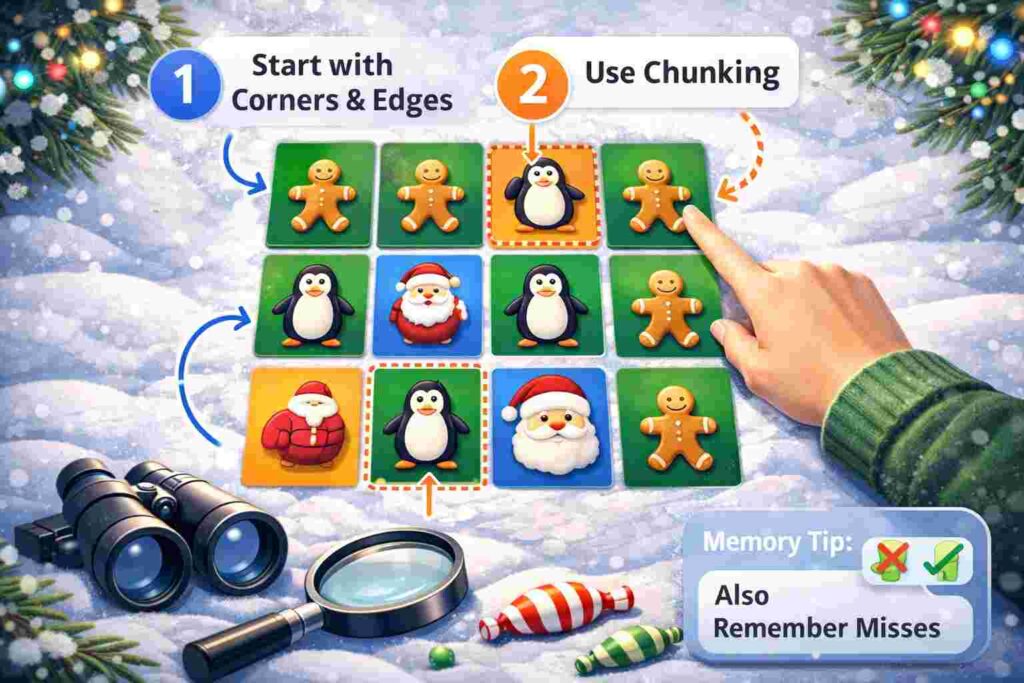
Begin with the corners and edges. These positions are easier to remember, so they give you a stable frame before the middle cards start blending together.
Next, use chunking. Break the board into small zones and memorize two or three positions at a time instead of trying to hold the entire layout in your head.
Then control your speed. Fast clicking feels efficient, but it usually creates repeated mistakes that cost more turns.
One rule matters more than most players realize: remember misses, not only matches. A failed pair gives you two useful locations for future moves.
A Practical Method That Improves Results
Treat the board like a grid. Assign a simple mental label to each area, such as top left, center right, or bottom row.
When you reveal a card, connect the image to its location immediately. Do not wait until the second flip to start memorizing.
That small habit changes performance. It reduces hesitation and makes each turn serve a purpose.
A disciplined player does not just react. A disciplined player collects information with every move.
Why This Game Helps Recall and Focus
A short memory game is not a medical tool, and it does not replace structured cognitive training. Its value is simpler and more useful: it trains immediate recall under light pressure.
For children, that supports recognition, patience, and concentration. For adults, it works as a quick attention reset that demands focus without requiring a long session.
The format is effective because it is brief. Users can play once, notice improvement, and return without friction.
Best Alternatives if the Official Game Is Unavailable
If the official version is not accessible, stay close to the original intent. Choose a browser-based matching game with a clean layout, no forced download, and minimal ad clutter.
For parents, design quality matters more than extra features. If the board is messy or the controls are unclear, the game stops being useful.
For adults, the best backup is the one with the least friction. Fast load time and clean navigation matter more than visual effects.
Also Read: Google Block Breaker Guide: Play in 3 Quick Steps.
Common Questions
Is the Google memory game free?
Yes. Users expect a free browser experience, and the official Memory Match version fits that expectation.
Can I play it on a phone?
Yes. It can be opened in a mobile browser, though desktop usually gives a better overview of the board.
Is it good for kids?
Yes, especially for short sessions. The game is visual, simple, and easy to understand without long instructions.
Why do some pages feel different from the game I expected?
Because the keyword is broad. Some pages target the phrase without matching the official Google version users usually want.
Final Take
The correct approach to google memory game is straightforward. Show users the official Memory Match version first, explain the rules in plain language, and then give them tactics that improve performance on the next round. This ensures you spend less time searching and more time improving your score.
