
A google gmail data breach has not been confirmed as a direct Gmail system hack. The real risk is usually stolen credentials, phishing, malware, or reused passwords tied to Gmail addresses. This guide explains what happened, how to check your account, and which security steps reduce account takeover risk today without reacting to every alarming headline, rumor, or post online.
- Was There Really a Google Gmail Data Breach?
- Direct Gmail Breach vs. Credential Leak
- Quick Answer: What Should Gmail Users Do First?
- How to Check If Your Gmail Account Is at Risk
- What Information Could Be Exposed?
- Gmail Breach Risk Matrix
- How to Secure Gmail After a Breach Scare
- What Businesses Should Do Differently
- Final Takeaway
- FAQs
Was There Really a Google Gmail Data Breach?
The phrase google gmail data breach is often used too broadly. It may describe a true platform breach, a leaked password list, a phishing campaign, or malware stealing browser-saved logins.
That distinction matters. Google has denied claims that it issued a broad warning about a major Gmail security issue, and said Gmail protections remain strong and effective.
Your real task is to check whether your Google Account is exposed through a weak password, reused password, infected device, or fake login page.
Direct Gmail Breach vs. Credential Leak
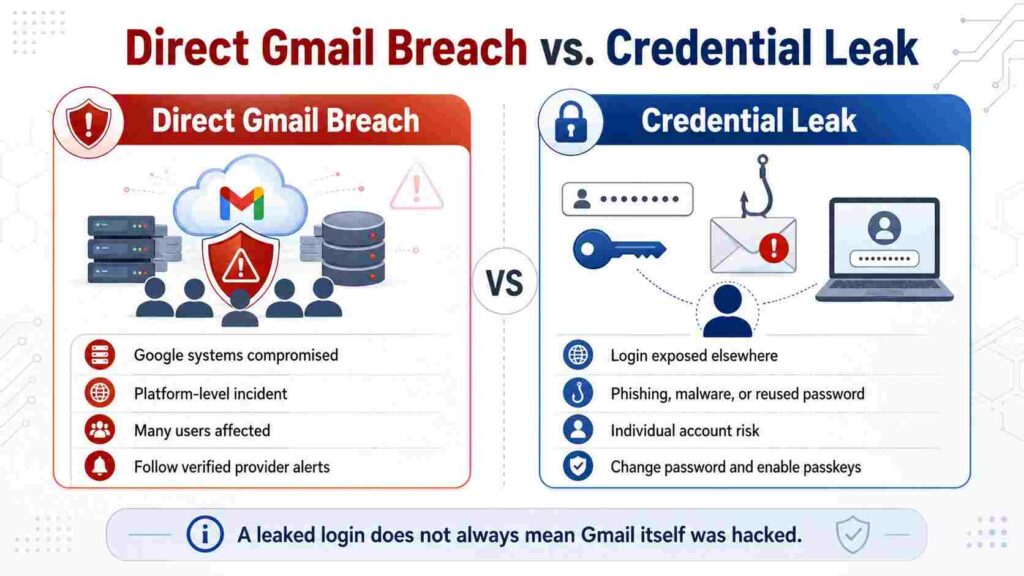
A direct Gmail breach would mean attackers accessed user data from Google’s infrastructure. Current public evidence does not confirm that.
A credential leak is different. Your Gmail address may appear in stolen data because you used that email on another site, saved a password in an unsafe browser session, or had malware on your device.
| Scenario | What it means | User action |
|---|---|---|
| Direct breach | Gmail infrastructure is compromised | Follow official Google notices |
| Credential leak | Email/password appears in stolen data | Change reused passwords |
| Phishing | You entered details on a fake page | Reset password and review devices |
| Account takeover | Someone accessed your account | Secure account immediately |
Quick Answer: What Should Gmail Users Do First?
Start with Google Security Checkup. Review recent security events, devices, recovery email, recovery phone, and sign-in methods. Google’s guidance points users to Security Checkup for personalized security recommendations.
If you see a device, location, or browser you do not recognize, sign it out. Then change your password from a clean device.
Next, open Gmail settings and check forwarding, filters, and delegated access. Attackers often create quiet rules that forward password reset emails, invoices, or closing documents to another inbox.
How to Check If Your Gmail Account Is at Risk
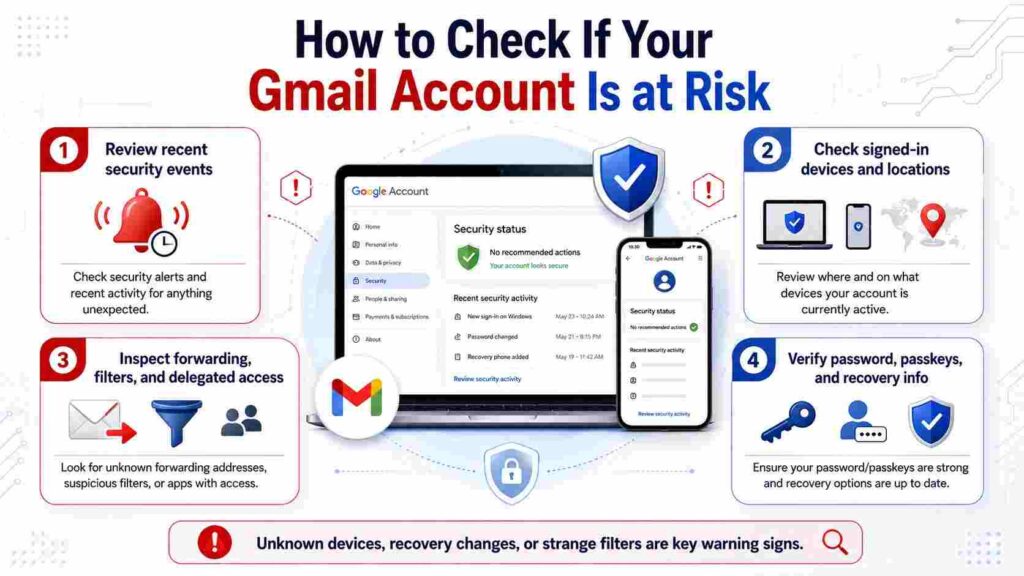
Use three signals. Did you receive a Google alert about a new sign-in, recovery change, or blocked attempt? Are there unfamiliar devices in your account? Is your Gmail password reused anywhere else?
If the answer is yes to any of these, treat the google gmail data breach concern as personal account risk, even if Gmail itself was not hacked.
Also check your password manager. If it warns that a password was found in a breach, change that password everywhere it was reused. One reused password can turn an old retail breach into a Gmail takeover.
What Information Could Be Exposed?
A compromised Gmail account can expose far more than messages. It can reveal password reset links, tax records, travel bookings, receipts, private photos, contracts, cloud files, and business discussions.
For real estate users, the risk is sharper. The FBI describes business email compromise as one of the most financially damaging online crimes, where criminals impersonate trusted sources to trigger payments or disclose sensitive information.
Example: a buyer receives fake “updated wire instructions” that appear to come from a title agent. If the attacker has monitored the Gmail thread, the timing, names, and language can look convincing.
Gmail Breach Risk Matrix
Use this matrix before taking action:
| Risk level | What you see | What to do |
|---|---|---|
| Low | Email appears in an old breach, but password is unique | Monitor and keep 2FA active |
| Medium | Gmail password was reused elsewhere | Change Gmail and reused passwords |
| High | Unknown device, login, or recovery change | Sign out devices and reset access |
| Critical | Money, legal files, or client data involved | Secure account and notify affected parties |
How to Secure Gmail After a Breach Scare
Change your password if it is weak, reused, or exposed. Use a long, unique password stored in a trusted password manager.
Turn on 2-Step Verification or use passkeys. Google describes passkeys as secure sign-in using your device screen lock, such as a fingerprint, face scan, PIN, or pattern.
Remove third-party apps you no longer trust. Review browser extensions, especially coupon tools, PDF converters, email add-ons, and unknown productivity extensions.
Scan your device for malware. If an infostealer copied saved passwords or session cookies, changing your password from the same infected machine may not solve the problem.
Also Read: Gmail Account Access Warning: What It Means and What to Do
What Businesses Should Do Differently
Businesses should not treat the google gmail data breach topic as a consumer-only issue. Gmail and Google Workspace accounts often contain invoices, contracts, payroll records, customer data, and transaction instructions.
Set a firm rule: no payment change is approved by email alone. Confirm wire instructions, vendor bank changes, and closing details through a known phone number or secure portal.
Admins should review login logs, OAuth app access, forwarding rules, recovery settings, and inactive users before transaction deadlines, not after money moves.
Final Takeaway
The google gmail data breach story is best handled with precision, not fear. There is no confirmed direct Gmail system breach in the current public record, but credential leaks and phishing can still put your account at risk. Check your devices, secure your password, enable stronger sign-in, and verify financial requests through a second channel.
FAQs
Was Gmail hacked in 2026?
No confirmed direct Gmail infrastructure hack has been established in public information. Most risk comes from credential leaks, phishing, malware, and reused passwords.
Should I change my Gmail password?
Yes, if it is reused, weak, old, or flagged in a breach. Also change it if you see unknown devices or recovery changes.
Is 2-Step Verification enough?
It is strong, but not perfect. Use passkeys where possible, remove suspicious apps, and avoid entering codes on unfamiliar login pages.
What should I do if my Gmail controls business payments?
Pause payment changes, verify by phone, review account access, and alert affected clients or partners if suspicious activity touched sensitive threads.
