
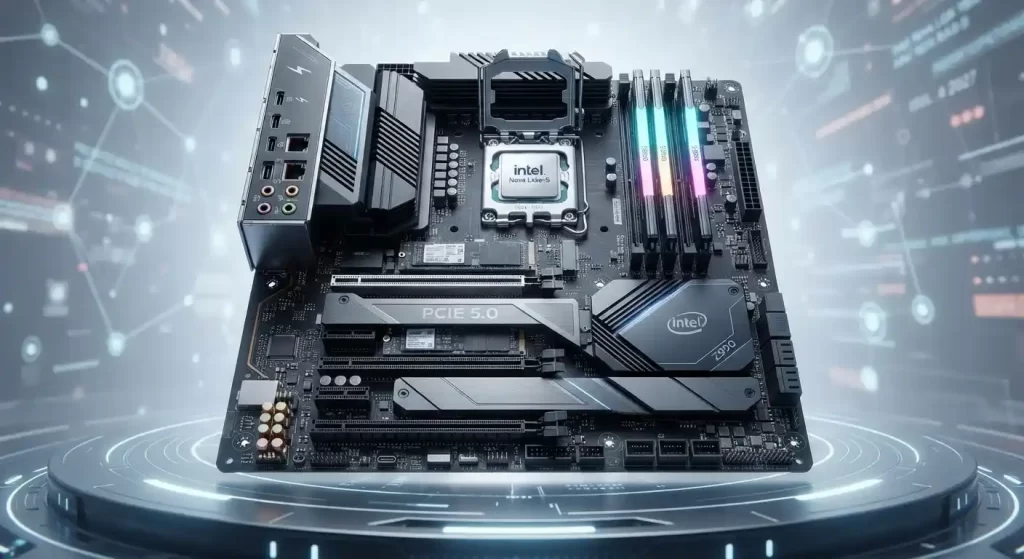
Pre-release disclosure: Intel has not officially launched the LGA1954 platform at the time of writing. Specifications described as “leaked” come from a chipset table attributed to Jaykihn, Eurasian Economic Commission (EEC) registrations, Vietnamese customs shipping records, and Computex 2026 booth evidence. These are treated as strong evidence, not confirmed fact. No manufacturer paid for inclusion.
Why the LGA1954 Motherboard Decision Matters More Than Usual
Intel’s Nova Lake-S generation arrives on a new socket with a different contact count and a relocated alignment notch, which means an LGA1851 board physically cannot accept a Nova Lake CPU and an existing Arrow Lake chip cannot seat in an LGA1954 board. The socket carries 1,954 contacts against LGA1851’s 1,851, and the notch has moved from the left side of the processor to the right. There is no adapter path. The CPU and the motherboard change together.
The compensating news is that existing LGA1700 and LGA1851 CPU coolers carry over without new mounting hardware. Noctua has stated directly that “all Noctua CPU coolers that are compatible with LGA1851 and LGA1700 are also compatible with Intel’s upcoming LGA1954 socket,” with no additional parts required. Thermaltake has made the same compatibility confirmation. For anyone moving from a recent Intel build, the cooling system survives the transition.
The launch cadence also shapes the buying decision. Intel plans mass production of Nova Lake-S in Q4 2026, with the 28-core model arriving first in Q1 2027 and the 52-core flagship following later in 2027. The platform is designed to be multi-generational: the leaked roadmap positions LGA1954 as supporting Nova Lake, then Razor Lake, then Hammer Lake, described internally as a “one-time investment that lasts for many years”. That claim is not official Intel messaging, but it is the strongest signal yet that this socket is intended to outlive a single CPU release.
Z990 vs Z970 vs B960: The Only Table You Need
The 900-series chipset family is where the real buying decision lives. The leaked table names five chipsets, but only three matter for consumer builds.
| Chipset | Total PCIe lanes | PCIe 5.0 from chipset | Overclocking support | Correct buyer |
|---|---|---|---|---|
| Z990 | 48 | 12 | CPU, BCLK, memory | Enthusiast, multi-Gen5 storage, flagship 52-core |
| Z970 | 34 | 0 | CPU and memory | Gaming-focused, single GPU, one or two NVMe drives |
| B960 | 34 | 0 | Memory only | Budget builds, stock CPU operation |
| Q970 | 44 | 8 | No traditional OC | Business / manageability |
| W980 | 48 | 12 | Memory OC, ECC | Workstation |
The data comes from a leaked specification table attributed to Jaykihn, and Intel has not confirmed the names or figures. Treat the lane counts as the best available planning guide, not a warranty.
The practical consequence is straightforward. Z990 is the only consumer chipset that provides 12 PCIe 5.0 lanes directly from the chipset, on top of 16 PCIe 5.0 lanes from the processor. That is what allows a board like Gigabyte’s Aorus Z990 Pro to run three PCIe 5.0 x4 M.2 slots alongside three PCIe 4.0 M.2 slots for six NVMe drives total. Z970 and B960 both stop at 34 lanes and provide zero chipset PCIe 5.0 lanes, which caps their high-speed storage ceiling even though Z970 retains CPU core overclocking.
Memory is the other differentiator. Nova Lake-S stays on DDR5 and is reported to natively support DDR5-8000, with CUDIMM and CQDIMM modules extending headroom beyond that in one-DIMM-per-channel configurations. A two-DIMM board is therefore an advantage, not a limitation, for anyone chasing frequency.
The Best LGA1954 Motherboards for 2027
The boards below are not speculative mockups. Each has appeared in at least one of four evidence streams: EEC regulatory registration, Vietnamese customs shipping records, a physical Computex 2026 demonstration, or a retail listing. The table summarizes the field before the detailed entries.
| Board | Chipset | Form factor | Evidence type | Best for |
|---|---|---|---|---|
| Gigabyte Aorus Z990 Xtreme | Z990 | E-ATX | EEC registration | 52-core flagship build |
| Gigabyte Aorus Z990 Pro | Z990 | ATX | Computex prototype | Six-drive storage arrays |
| ASRock Z990 Taichi Creator | Z990 | ATX | Shipping manifest | Content creation I/O |
| ASRock Z990 Steel Legend WiFi | Z990 | ATX | Shipping manifest | Value Z990 entry |
| ASUS ROG Maximus Z990 Apex Encore | Z990 | ATX | Retail listing | Manual memory tuning |
| Gigabyte Z990 Aero Wood | Z990 | ATX | EEC registration | Design-led workstation |
| ASRock Z970 LiveMixer WiFi | Z970 | ATX | Customs record | Gaming value |
| ASRock Z970 Pro-A WiFi | Z970 | ATX | Customs record | Volume mid-range build |
Gigabyte Aorus Z990 Xtreme
Gigabyte registered 24 Z990 motherboard models with the EEC in October 2026, and the Aorus Z990 Xtreme sits at the top of that list in the E-ATX form factor. The registration confirms the model name, the chipset, and the physical size; it does not confirm VRM phase count or memory validation, so those figures should be treated as pending until Gigabyte publishes a specification page. What the registration does establish is that Gigabyte is building a full flagship tier rather than a token halo board. For a 52-core Nova Lake build that will later receive a Razor Lake or Hammer Lake CPU, the Xtreme is the most logical long-term Z990 anchor in Gigabyte’s lineup.
Gigabyte Aorus Z990 Pro
This is the most thoroughly documented LGA1954 board in existence. Gigabyte displayed it at Computex 2026 with the socket taped over and a “Z99Pro” label on the rear of the PCB, later confirming it as the Aorus Z990 Pro. The visible specification includes three PCIe 5.0 x4 M.2 slots plus three PCIe 4.0 M.2 slots, three 8-pin CPU power connectors, and a dedicated fan above the DRAM slots for memory thermal management. The three-connector layout aligns with Intel’s reported Z990 reference design guidance, which adds a third 8-pin option for overclocking headroom on dual-compute-tile parts. For a storage-heavy editing or simulation build, no other confirmed board offers this much verifiable I/O.
ASRock Z990 Taichi Creator
ASRock Z990 boards began appearing in shipping manifests in September 2026, and the Taichi Creator is among the confirmed model names alongside the Steel Legend WiFi, Challenger WiFi, Pro RS, and Taichi White. The manifest confirms the name and the chipset; the “Creator” designation follows ASRock’s existing product convention of prioritizing high-bandwidth connectivity and sustained-load stability over gaming aesthetics. Buyers should wait for the final rear-I/O list before committing, because the Creator line’s value depends entirely on which controllers ASRock fits. What the shipping record does prove is that the board is design-complete and moving through the supply chain, not a slideware placeholder.
ASRock Z990 Steel Legend WiFi
The Steel Legend WiFi is the value entry into the full Z990 feature set and was among the first ASRock LGA1954 boards to appear in shipping records. It inherits the white-and-silver aesthetic that has made the series popular in modern case builds, but the important detail is the chipset underneath: full Z990 means 12 chipset PCIe 5.0 lanes and BCLK overclocking, not the reduced Z970 lane count. The trade-off will be in VRM headroom and controller count relative to the Taichi, which matters if you plan to run a 52-core chip at sustained all-core loads. For a 28-core gaming and productivity build, it is the most rational way to buy Z990 without paying for flagship redundancy.
ASUS ROG Maximus Z990 Apex Encore
A regional retail announcement describes the ROG Maximus Z990 Apex Encore as a 2-DIMM board rated to DDR5-9600, with internal testing reported to reach DDR5-10000 and a 24+2+2 phase power design using 110A MOSFETs. The two-slot memory topology is the correct engineering choice for maximum frequency on Nova Lake, because it reduces load on the memory controller. ASUS has not published a formal LGA1954 product page for this board, so the model name should be read as a strong retail signal rather than a confirmed global SKU. If manual memory tuning is part of your build plan, this is the most specialized LGA1954 option surfaced so far.
Gigabyte Z990 Aero Wood
Gigabyte’s EEC filing includes Z990 Aero Wood and Z990 Aero Dark Wood, both in the ATX form factor, continuing the stylized wood-element design language the company introduced on its AMD X870E Aero series. The design material is reported to be a PVC-based finish rather than real timber. Underneath the aesthetic it is a full Z990 board, which means it carries the same overclocking and chipset Gen5 lane capabilities as Gigabyte’s gaming models. This board matters because it is the only registered LGA1954 option aimed at visible-room workstations rather than RGB-heavy gaming builds. Specification details beyond form factor and chipset remain unconfirmed.
ASRock Z970 LiveMixer WiFi
The Z970 tier became concrete in November 2026, when two ASRock Z970 boards — the LiveMixer WiFi and the Pro-A WiFi — appeared in the NBD customs database with PCB shipments dated to late September 2026. Z970 supports CPU and memory overclocking but provides no chipset PCIe 5.0 lanes. The LiveMixer name follows ASRock’s content-creation I/O convention, which typically means a generous USB layout and audio-focused connectivity. For a gaming build with one graphics card and one or two NVMe drives, Z970 is the smarter budget allocation: the money saved goes into the GPU, and the missing chipset Gen5 lanes never become a bottleneck.
ASRock Z970 Pro-A WiFi
The Pro-A WiFi is the second confirmed Z970 model and the more conventional choice for a mid-range LGA1954 build. It shares the overclocking-enabled Z970 foundation with the LiveMixer but adopts ASRock’s simpler, business-clean board design. The Pro-A line has historically been ASRock’s volume ATX product, and the customs record suggests that positioning continues on LGA1954. For a 28-core Nova Lake CPU paired with a high-end graphics card and a single PCIe 5.0 SSD, the Pro-A delivers the essential platform features without the Z990 premium. It is unremarkable by design, and that is precisely what makes it the sensible choice.
How to Match the Board to Your Build
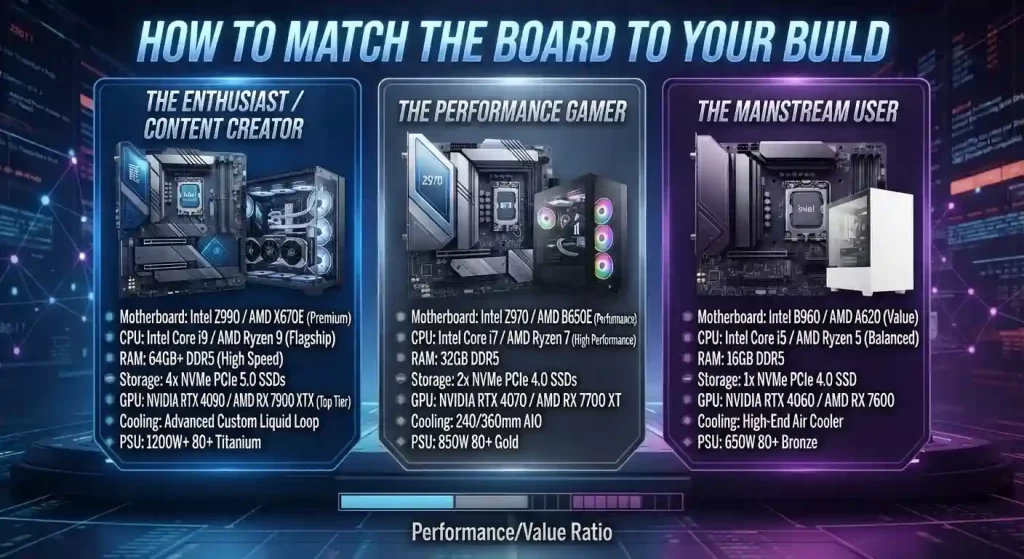
The chipset decision should be made before the brand decision, and the workload should be made before the chipset decision.
| Build type | Recommended chipset | Why |
|---|---|---|
| 52-core flagship, multi-Gen5 storage, manual tuning | Z990 | Only chipset with 12 chipset Gen5 lanes and full BCLK OC |
| 28-core gaming, one GPU, one or two NVMe drives | Z970 | CPU OC retained; no wasted spend on unused Gen5 lanes |
| Budget stock build | B960 | Memory OC only; lowest platform cost |
| Workstation with ECC requirement | W980 | Only 900-series chipset with ECC support |
Power delivery deserves separate planning. The 52-core dual-compute-tile Nova Lake-S flagship is reported to draw 474 W in PL2 mode, confirmed by leaker Jaykihn — an unprecedented figure for an Intel consumer desktop platform. Intel’s Z990 reference design reportedly includes the option of three 8-pin CPU connectors for exactly this reason, though two 8-pin boards are expected to run the 44-core and 52-core parts at stock. If you are buying a Z990 flagship board, a high-quality 1200 W or larger ATX 3.1 unit with native 12V-2×6 cabling is the forward-looking choice. For a Z970 or B960 build with a 28-core part, a well-regulated 850 W to 1000 W unit remains appropriate.
Form factor availability is the last constraint. Gigabyte’s 24-model Z990 registration includes only one Mini-ITX board — the Aorus Z990 I Pro — and three Micro-ATX models, with the rest split between ATX and E-ATX. Small-form-factor builders should plan for a later purchase rather than a launch-day one.
What the Leaks Still Haven’t Told Us
Three important gaps remain, and pretending otherwise would mislead readers.
- Pricing is unknown. No registration or customs record reveals MSRP. Launch-platform premiums are historically steep, and the 474 W power target suggests flagship Z990 boards will be priced as HEDT-adjacent products.
- Final BIOS and memory QVL lists do not exist yet. DDR5-9600 on a two-DIMM board is a validation claim, not a guarantee that a specific retail kit will train at that speed on day-one firmware.
- The retail launch window is inferred, not announced. Q1 2027 for the 28-core part comes from a leaked distributor slide, not an Intel press release.
Buyers who need a machine immediately should choose a mainstream Z990 or Z970 board from a vendor with confirmed shipping records, because those boards are furthest along the validation chain. Buyers who can wait until mid-2027 will likely see better pricing, more mature firmware, and the Micro-ATX and Mini-ITX options that are scarce in the current registrations.
Also Read: Best Gaming CPU 2026: Proven Picks for Faster FPS
Conclusion
LGA1954 is a clean break, and the 900-series chipset structure gives that break a clearer purpose than the last socket transition. Z990 is the only consumer chipset that combines full BCLK overclocking with 12 chipset PCIe 5.0 lanes, which is why the Aorus Z990 Pro’s six-drive layout and the Apex Encore’s DDR5-9600 memory topology are possible in the first place. Z970 and B960 are not compromised boards; they are correctly narrowed boards for gamers and budget builders who will never use the extra lanes.
The boards with the strongest evidence behind them — Gigabyte’s Z990 Pro and Aorus Xtreme, ASRock’s Taichi Creator and Steel Legend, and the ASUS Apex Encore — show that vendors are treating this platform as a serious multi-year investment rather than a one-generation stopgap. Choose the chipset for your workload, choose the board for its power delivery and storage layout, and treat the socket as the foundation it is designed to be.
Frequently Asked Questions
Does LGA1954 support ECC memory?
Not on consumer chipsets. According to the leaked 900-series table, ECC support is limited to the W980 workstation chipset; Z990, Z970, B960, and Q970 are all listed without ECC capability. If error-correcting memory is a requirement, a W980 board is the only path within this platform family.
Is Wi-Fi 7 mandatory on LGA1954 motherboards?
No. Wireless is a board-vendor decision, not a chipset requirement. The leaked chipset table specifies USB and PCIe lane allocations but says nothing about integrated Wi-Fi. Gigabyte’s EEC filing, for example, includes both “WiFi 7” suffixed models and models without that suffix, confirming that connectivity tiers will vary by SKU rather than by chipset.
What is the difference between Q970 and Z990?
Both are 900-series chipsets, but they target different buyers. Q970 offers 44 total PCIe lanes and 8 chipset PCIe 5.0 lanes, with no traditional CPU overclocking, while Z990 offers 48 lanes, 12 chipset Gen5 lanes, and full CPU, BCLK, and memory overclocking. Q970 also adds vPRO and standard manageability support that Z990 lacks. For a business fleet, Q970 is the correct choice; for an enthusiast build, it is the wrong one.
How much memory can an LGA1954 motherboard hold?
Capacity depends on the board’s DIMM topology, not the socket. ASUS’s 2-DIMM Apex design is reported to support up to 96 GB, trading capacity for frequency headroom. Four-DIMM Z990 boards will offer higher maximum capacities at lower validated speeds. Buyers should check the specific board’s QVL rather than assuming a platform-wide limit, because no finalized LGA1954 memory specification has been published.
Does LGA1954 support Thunderbolt 5?
The chipset table lists two processor Thunderbolt 4 / USB4 ports on Z990, Q970, and W980, and one on Z970 and B960. Thunderbolt 5 is not part of the leaked chipset specification; any Thunderbolt 5 support would come from an additional discrete controller that a board vendor chooses to fit. Gigabyte’s Z990 Pro prototype shows four USB-C ports that “may support Thunderbolt 5,” but the company has not confirmed this. Treat Thunderbolt 5 as a board-level feature to verify, not a platform guarantee.
