

It feels as if a new social platform pops up every month, yet the appetite for fresh places to share, react, and connect never slows down. If you are an aspiring developer, a startup founder, or the tech-minded dreamer in a small business, you have likely typed “how to make a social media app” into a search bar more than once. This guide walks you through the journey from napkin sketch to a live product in the stores, focusing on lean, practical moves rather than buzzwords. We will keep the tone conversational, but every point here is field-tested and current as of February 2026.
- How to Create a Social Media App: Idea and Planning
- Market Research and Target Audience
- Core Features of a Social Media App
- Technology Stack Selection
- How to Build a Social Media App: Development Process
- How to Code a Social Media App: Key Technical Concepts
- Social Media App Development Tutorial: Step-by-Step Workflow
- Testing and Quality Assurance
- Launching a Social Media App
- Scaling and Performance Optimization
- Common Challenges in Social Media App Development
- Conclusion
How to Create a Social Media App: Idea and Planning

The spark usually hits in a coffee shop or a Discord chat: “Wouldn’t it be great if there were a space just for…?” Capture that moment fast. Open a doc and write one sentence that explains why people will come back tomorrow, not just on launch day. Keep trimming that sentence until it’s plain enough for your non-tech friend to repeat.
With the hook clear, sketch a tiny storyboard of the first five screens: welcome, sign-up, feed, post, profile. You will spot gaps in flow long before a single pixel is pushed. At this stage, many founders bring in a social media app development company for a short discovery sprint. A good external team challenges assumptions, puts price tags beside each “nice to have,” and hands back a lean backlog you can actually fund.
Money talk belongs here, not later. List every way the app might pay the bills – ads, in-app tips, premium filters – and sanity-check each against the size of your niche. Only then should you draft a one-page tech brief and a two-page product roadmap. Anything fatter invites scope creep and months of burn.
Finally, validate the vision with real humans. Interview twenty to thirty potential users, show them the wireframes, and listen for unprompted excitement. If no one asks, “When can I try this?”, pause and tighten the concept. That blunt feedback round costs a week; rebuilding post-launch can drain a year.
Market Research and Target Audience
Research is cheaper than rewrites. Interview at least twenty potential users in your niche. Ask them how they currently solve the problem you hope to tackle. Probe real habits: How many minutes per day do they spend on similar platforms? What makes them close the app in frustration?
Competitor audits matter too. Open five rival apps, and jot down onboarding flows, content feeds, and monetization patterns. Note the gaps: slow video upload, weak moderation, or clunky group management. When you return to “how do you make a social media app,” these gaps become your differentiators.
Do not ignore macro trends. As an example, the digital transformation within the energy industry has demonstrated how community-specific to the sector can blow up when complexity collides with collaboration. The same thing is happening to climate tech, remote health, and creator economy corners in the contemporary world.
Core Features of a Social Media App
Even the leanest MVP usually needs:
- Secure sign-up and profile creation
- A feed that mixes posts, images, and video snippets
- The ability to follow or friend other users
- Reactions – likes, comments, or quick emoji taps
- Basic push notifications
- A simple settings page for privacy and account controls
These are the bare minimum you need to pursue before you go in pursuit of advanced AI suggestions or in-app livestreaming. There should be a convenient litmus test: in the event that a feature removal does not cause a breakdown in daily sharing, it can be deferred.
Keep in mind the LSI staples: people want to share content in a free way, to be visible by posting comments, and to create personal space. Keep the interface uncluttered; every extra button is one more chance for a first-time visitor to say, “I’ll pass.”
Technology Stack Selection
Think of the stack as a band, not a checklist. Each instrument has to complement the others and fit the venue you’re playing. If the app’s heartbeat is real-time chat or live audio, Node.js with a lightweight WebSocket layer feels natural. When the emphasis is on robust data relationships – say, threaded comments, nested replies, or moderation logs – Django or FastAPI with PostgreSQL keeps the data model honest.
Mobile choices revolve around team bandwidth. React Native and Flutter both let one small crew ship iOS and Android together, and their plugin ecosystems now cover everything from biometric sign-in to low-latency video. Native Swift/Kotlin still wins raw performance, but you’re signing up for two codebases and double QA cycles.
Media matters more than founders expect. If your feed leans heavily on short video, budget early for a CDN such as Cloudflare Stream or AWS CloudFront to dodge that dreaded buffering spinner. Offloading image compression and thumbnail generation to serverless workers keeps the main API snappy. A well-tuned Redis cache in front of your primary database can shave response times under the 200 ms mark that users now treat as the norm.
Above all, pick tech your team can debug at 3 a.m. A “cool” stack that no one knows inside out will slow you more than an older framework that the crew can bend to their will.
How to Build a Social Media App: Development Process
Building is where concept meets code, and discipline trumps enthusiasm.
Backend Development
Architect an API-first backend. Write endpoints for user registration, session tokens, post creation, and follow actions. Lean toward REST unless you need heavy real-time streaming, in which case GraphQL subscriptions or WebSockets shine. Integrate media storage early; moving images from a local disk to S3 two months in is never fun.
Security lives in layer one: password hashing with Argon2, OAuth 2.0 for third-party sign-ins, and rate limits to foil spam. Automate tests for each endpoint – later, when you think about how to develop a social media app for scale, those tests will save entire weekends.
Frontend Development
Design a feed first. Take ten posts and show more posts as the user scrolls, but cache them so that offline reading can be done even by users in the subway. Animations should be kept to a minimum; flashy transitions are wonderful, but can be reserved until v1.1.
Include libraries of components, such as React Native Paper and Material, offered by Flutter, to use such components as buttons and input fields. That compatibility hastens the iteration process and simplifies accessibility checks.
Database and API Integration
Model relationships carefully: a Post table links to a User table, and a Comment links back to both. Index surprisingly small fields like “created_at” and “likes_count” because feeds sort by them constantly. Build a health-check route – /status – that pings database connectivity, CDN latency, and job-queue buildup.
At this point, your MVP shares text, photos, or short clips. In other words, you have solved the base case of “how to develop a social media app” without bells and whistles.
Also Read: Social Media Stuff Embedtree Review: Is It Worth It? (2026)
How to Code a Social Media App: Key Technical Concepts
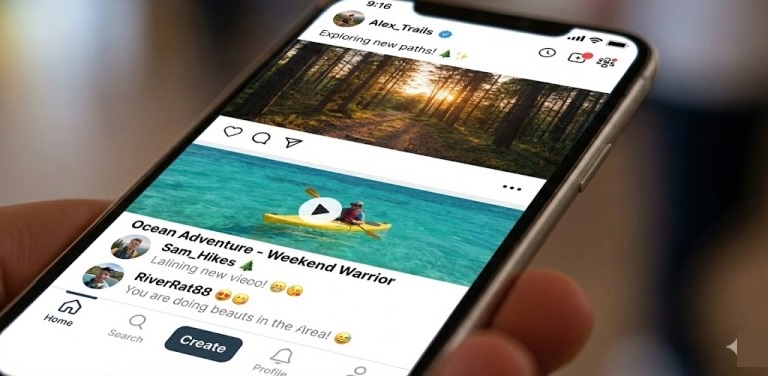
Great social platforms feel weightless, almost magical, yet they rest on a few gritty ideas you cannot fake. Pagination is the first. Whether you call it infinite scroll or pull-to-refresh, the feed must fetch bite-sized chunks so a budget phone in a rural network still scrolls smoothly. Cursor-based pagination, not page numbers, is your friend here because it plays nicely with live inserts while a user is mid-scroll.
Background work is the silent hero. The moment someone hits “post,” kick video transcoding, link preview scraping, and notification fan-out into a worker queue. BullMQ, Sidekiq, or Cloud Tasks – pick one and never let the web thread babysit heavy jobs. Users judge speed by the time between tapping “share” and seeing their content in the feed; workers make that gap vanish.
Then there’s presence. Those tiny “typing…” dots and live-like counters glue people to the screen. A dedicated presence service, often Redis-backed, tracks who is online and which post they’re viewing without drowning the database in writes. If the network grows, shard channels by topic or geographic region to keep bandwidth sane.
Wrap all of this in automated tests from day one. A failing upload on a single Android model can tank app-store ratings overnight. Tests catch the edge cases you’ll never reproduce by hand.
Social Media App Development Tutorial: Step-by-Step Workflow
Let’s stitch the pieces into a weekly roadmap, a miniature social media app development tutorial you can note.
Weeks 1-2. Validate concept, write problem brief, and finalize the feature map.
Weeks 3-4. Design wireframes with Figma. Conduct a second round of user feedback, and tweak navigation.
Weeks 5-8. Create stand up backend skeleton, configure CI/CD, and push initial user registration.
Weeks 9-10. Implement feed read/write. Combine media storage and CDN.
Weeks 11-12. Facility notification service, privacy settings, and rudimentary moderation tools.
Week 14. 100 outsiders took part in a closed beta. Check retention, change the copy, and fix security holes.
Week 15. Prepare store assets, pricing models, and marketing copy. Freeze feature set for launch.
Notice the sequence forces feedback loops at three points. That rhythm is the practical answer to “how do you make a social media app” without drifting for six months and realizing users wanted something entirely different.
Testing and Quality Assurance
Automated unit tests guard logic – does posting fail gracefully? Integration tests hit combined flows – can a new user create, edit, and delete a post in under two seconds? Finally, real device testing covers edge cases such as low-resource Android phones where 4K video chokes.
Security audits deserve their own sprint. Pen-test your API, run dependency scanners, and review role-based access controls. Regulations tighten each year, and nothing sinks a launch like a privacy breach headline.
Launching a Social Media App
A launch is more than pressing “publish.” Submit to the Apple App Store and Google Play a week early, because review queues still fluctuate. Make a staging replica so you can make last-minute changes without putting production at risk.
Plan social proof: get early evangelists to post screenshots, set up short demo videos, and give away a free premium trial for a short time. The first 48 hours dictate App Store ranking momentum. When talking to the press or investors, frame your story inside bigger currents, e.g., the same digital transformation in the energy industry mindset that values open data sharing now inspires your new climate-action community.
Scaling and Performance Optimization
If the launch numbers are good, focus on keeping response times below 200 ms.
It’s easier than ever to scale horizontally. Use Docker to containerize services, Kubernetes or ECS to orchestrate them, and auto-scaling groups to make them work. Use Prometheus and Grafana to keep an eye on the health of your system, and Mixpanel or Amplitude to keep an eye on how users act.
To shave milliseconds, preload media on fast scroll predictions, move static assets to HTTP/2 CDNs, and batch push notifications. That constant chiseling shows investors you not only know how to build a social media app, but you also know how to keep it smooth at 100x traffic.
Common Challenges in Social Media App Development
Moderation creeps up fast. The first wave of spam or harassment usually appears within days of a public beta. Add a simple flagging tool to automated filters, keyword blocklists, and basic ML classifiers so that regular users can help police bad actors. Even a tiny community will surface patterns your filter never anticipated.
Privacy law is a moving target. Map every data point you collect – email, location, device tokens – into a living compliance sheet. When the EU or California tweaks regulations, you should be editing a doc, not hunting through code to discover where you stored birth dates. Failing an audit can freeze international expansion just when growth is taking off.
Finally, resist kitchen-sink syndrome. Requests for stories, live shopping, or crypto wallets will pour in once early adopters get comfy. Treat each idea like a stone in a backpack: add too many and the climb stalls. A tight product north star and ruthless metrics discipline are the only antidotes.
Conclusion
You now have a grounded path from idea spark to a scalable product. Revisit the core questions often: Why will users care? How will the app earn money? Are we measuring the right signals? Mastering those will take you far further than any trendy framework.
Whether you hire a specialist team or code through weekends yourself, remember that creating a social media app is a marathon of small improvements, candid user conversations, and disciplined focus. If you keep the loop tight (plan, build, test, listen), you will not only learn how to develop social media app mechanics, you will craft a platform that people feel excited to open every single day.
