
Knowing how to use magnet links comes down to one thing: your browser must pass the link to a torrent client. Install a trusted client, open the link, check the file details, then download only if the source is legal and safe.
What Is a Magnet Link?
A magnet link is a file-finding link, not a normal download link. It does not pull a file from one website or server. Instead, it gives your torrent client the information it needs to search for that file across a peer-to-peer network.
That is why clicking a magnet link often feels different from clicking a regular download button. Nothing useful happens unless your device already has a torrent client that understands the magnet format.
A basic magnet link may look like this:
magnet:?xt=urn:btih:examplehash&dn=filename&tr=trackerThe key part is the hash. Think of it as the file’s identity tag. Your torrent client reads that tag, looks for matching data from other users, and starts building the download once it finds enough active sources.
How to Use Magnet Links Step by Step
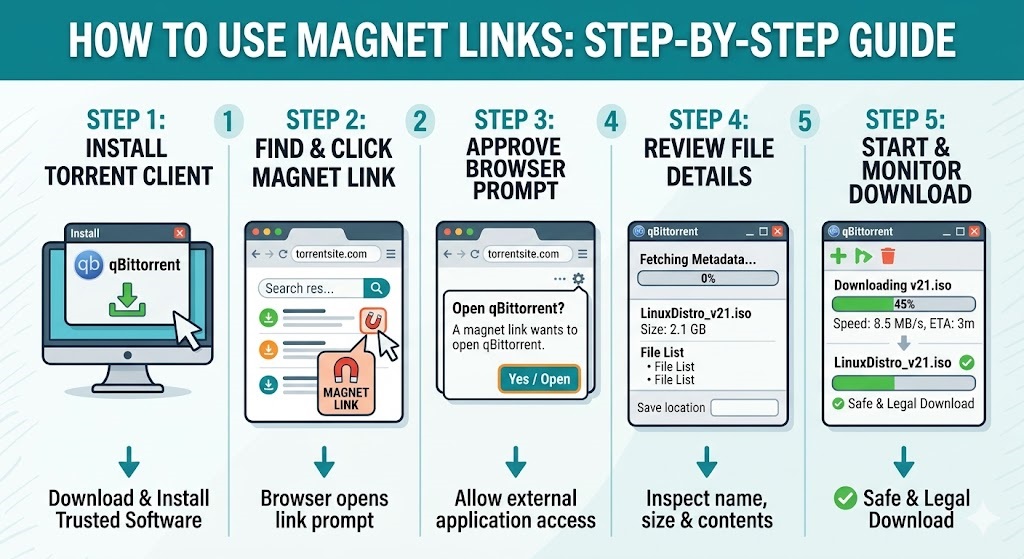
Start with the software. Install a reliable torrent client such as qBittorrent, Transmission, Deluge, or BitTorrent. Do not rush through the installer; avoid extra toolbars, bundled offers, or settings you do not recognize.
Now click the magnet link. Your browser should ask if you want to open it with your torrent client. That prompt is normal. It means the browser is handing the job to the right type of app.
Before you approve anything, check the source. A magnet link from an official Linux distribution page is very different from a random link on a spam-filled download site.
Once the torrent client opens, pause for ten seconds. Look at the file name, file size, file list, and save folder. If the title says one thing but the file list shows something else, cancel it.
After you confirm the details, the client will fetch metadata. Sometimes this happens almost instantly. Sometimes it takes a minute because the client has to find peers before it can show the full file information.
Magnet Link vs Torrent File
Magnet links and torrent files serve the same general purpose, but they take different routes.
| Feature | Magnet Link | Torrent File |
|---|---|---|
| Extra file required | No | Yes |
| How it opens | Browser sends it to the client | You download and open .torrent |
| Metadata | Collected from peers | Already included |
| Easy to share | Yes | Less convenient |
| Better for | Quick access | Reviewing details first |
A magnet link is cleaner when you want to start quickly. A torrent file can be better when you want more information before adding anything to your client.
Neither option makes a download safe by default. Ultimately, security relies on the substance of the material, its origin, and your own due diligence.
How to Open Magnet Links on Your Device
On Windows, the torrent client usually asks to handle magnet links during installation. If clicking a link does nothing, open Default Apps and check the protocol settings.
On macOS, open your torrent client and check its preferences if the browser does not trigger it. Most clients include a setting for magnet links or file associations.
On Linux, setup can vary. Your browser, desktop environment, and torrent client all play a role. qBittorrent, Transmission, and Deluge support magnet links, but manual protocol setup may be needed.
On Android, install a torrent app that supports magnet links. When Android shows the “Open with” menu, choose your torrent client and review the download before starting it.
How to Set a Default App for Magnet Links

Your browser cannot handle a magnet link alone. It needs to send the link to an app that understands the magnet protocol.
If the wrong app opens, change the default handler. If no app opens, your system probably has no magnet handler registered.
Open your torrent client settings and look for options like Associate with magnet links, Register magnet URI handler, or Use as default torrent app.
This one setting solves many problems. Without it, magnet links may fail silently, open the wrong program, or keep asking what app to use.
Why Your Magnet Link Is Not Working
The first thing to check is simple: is a torrent client installed? If not, the magnet link has nowhere useful to go.
The next issue is browser permission. Chrome, Firefox, Edge, and other browsers may block external app prompts until you approve them. Look near the address bar or browser permission panel.
If the client opens but sits on “downloading metadata,” the file may have weak availability. A torrent needs active seeders or peers. Without them, the client cannot collect the information it needs.
Your network can also get in the way. Firewalls, VPN settings, antivirus tools, school Wi-Fi, and office networks may restrict peer-to-peer traffic. Do not turn protections off blindly; check the settings and understand the risk first.
Sometimes the link is simply bad. Old, fake, or low-quality magnet links are common on unreliable sites.
Also Read: VIPBox Down? Fixes, VPNs & 5 Safe Alternatives (2026)
Are Magnet Links Safe and Legal?
A magnet link is only a pointer. It is not automatically safe, and it is not automatically illegal. The risk depends on what it points to.
Use magnet links for content you are allowed to download. Good examples include Linux ISOs, open-source software, public domain files, and files shared directly by the creator.
Avoid magnet links for cracked apps, pirated movies, paid games, strange archives, and unknown executable files. That is where malware and legal trouble are most common.
Before starting a download, check the file name, size, extension, source reputation, and comments if they are available. Treat .exe, .bat, .scr, and password-protected zip files with extra caution.
Final Thoughts
Magnet links are easy once the setup is right. Install a trusted torrent client, let your browser open the link in that client, check the file details, and only download legal content from sources you trust.
If a magnet link fails, do not guess. Check the client, browser prompt, default app setting, seeders, peers, and source quality. One of those is usually the real problem.
FAQs About Magnet Links
Can I use a magnet link without a torrent client?
No. A browser may recognize the link, but a torrent client is needed to process it and find peers.
Why is my magnet link stuck on metadata?
It usually means the client has not found enough active peers. Wait briefly, check seeders, or use a healthier source.
Is a magnet link the same as a download link?
No. A download link pulls from a server. A magnet link helps a torrent client find the file through other users.
Can magnet links contain viruses?
The link itself is not usually the problem. The downloaded file can be unsafe if the source is untrusted.
