


Choosing the right server software is only half the decision. The bigger question — and the one that quietly decides your IT budget — is how you license it. For most organizations, the server stack still runs on Microsoft: Windows Server for infrastructure, Exchange Server for mail, SQL Server for data. The software choice is rarely controversial. The licensing model behind it, however, can swing the cost by thousands — and few buying guides spell out the trade-offs clearly. Here’s how the three routes compare, and when each one makes sense.
The three ways to license
Buy new (volume licensing). You purchase current licenses at full list price. You get the latest version and clean compliance, but it’s the most expensive route — and you pay top price whether or not you actually need the newest release.
Go cloud (subscription). Microsoft 365, Azure and hosted services replace a one-time purchase with a recurring fee. That’s flexible and scales well for variable workloads. But the cost never stops, and for stable, predictable infrastructure a subscription often works out more expensive over a multi-year horizon. The direction of travel matters too: Microsoft has confirmed another round of Microsoft 365 price increases taking effect on July 1, 2026. Locking your baseline into an open-ended subscription is a real budget risk worth weighing.
Buy used (second-hand licensing). Original, perpetual licenses resold legally on the secondary market. You get the same software, the same scope and the same update eligibility as new — typically at a significantly lower one-time cost. Ideal for stable on-premise workloads where you don’t need the very latest version.
Across numerous server deployments, teams frequently miss the third alternative—yet that is precisely where the greatest budget savings are found.
| Route | Best For | Budget Impact |
| Buy New | Edge cases requiring cutting-edge 2026/2027 features. | High upfront CAPEX |
| Go Cloud | Highly variable workloads, rapid scaling, low internal IT capacity. | Predictable but high recurring OPEX |
| Buy Used | Stable, on-premise or hybrid environments (Windows/SQL/Exchange). | Lowest TCO (One-time investment) |
Product by product: what to watch for
Windows Server
Windows Server is licensed per physical core (with a per-server minimum), plus a Client Access License (CAL) for each user or device that connects. Managing the CAL layer is precisely where expenses escalate and missteps occur—under-licensing exposes you to compliance audits, while over-licensing squanders your budget. Versions like Windows Server 2022 and 2019 remain fully supported and are widely available used, making them a strong fit for stable file, print, Active Directory and virtualization roles.
Exchange Server
If you keep email on-premise — for control, data residency or regulatory reasons — Exchange Server follows a Server-plus-CAL model. Exchange Server 2019 and 2016 are the perpetual on-premise versions most commonly sourced second-hand. For organizations not ready to move mail fully to the cloud, used licensing keeps an on-prem deployment affordable without locking you into an open-ended subscription.
SQL Server
SQL Server is usually the most expensive item on the list, which makes it the biggest single savings opportunity. Depending on edition, it can be licensed two ways — per core, or Server + CAL — and the right choice depends on how many users actually hit the database. For internal line-of-business systems with a known, limited user count, Server + CAL is often far cheaper than per-core. Used SQL Server 2022 or 2019 licenses can cut this line item dramatically.
Is buying used actually legal?
Yes — and this is the part worth getting right. The European Court of Justice (2012) and the German Federal Court of Justice (2013) confirmed that original software licenses can be resold under the “principle of exhaustion.” A properly transferred license is legally yours, with the same rights as a new one. The catch is provenance: the license must be genuine, fully transferred, and documented.
Also Read: Microsoft Ink: Guide to Digital Writing & Code Tools
How to buy safely: a short checklist
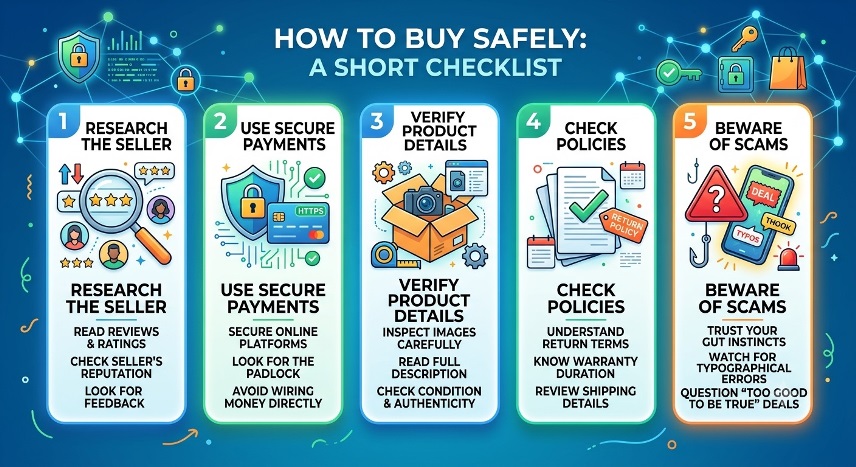
- Proof of origin for every license, with a clean transfer chain.
- Audit-proof documentation you can hand to Microsoft if they ever ask.
- Supplier liability — the seller should stand behind what it sells, not just pass it on.
- Fast, verifiable deliveryof genuine installation and activation media.
Where Soft & Cloud fits
This is exactly the gap Soft & Cloud fills: an independent provider of used Microsoft licenses with more than ten years of TÜV-certified transfer processes, audit-proof documentation for every license, and full liability for what it supplies. Because the company also offers independent licensing advisory, you can map what you genuinely need before you buy — so you don’t just pay less, you buy correctly.
For Windows Server, Exchange Server and SQL Server in stable on-premise roles, a legal used license is often the most cost-effective route available — and the one most buying guides forget to mention.
Planning your next licensing purchase? Soft & Cloud offers a no-obligation consultation to help you weigh new, cloud and used side by side.
About Soft & Cloud: a TÜV-certified provider of used Microsoft licenses and licensing advisory services, based in Münster, Germany.
