

From the very beginning, blurry photos have been a problem for shooters of all stripes, and if internet articles and posts are anything to go by, the problem has remained till this very day. It used to be the case that if you had a blurry photo, the chances it could be fixed were not very high. However, in today’s digital age with the advent of AI, more and more tools are boasting de-blurring and sharpening technology using trained AI models to fix what was once thought unfixable.
We’re going to pick three prominent de-blurring and sharpening tools and find out how they compare in real-world use.

First Competitor: SoftOrbits Easy Photo Unblur with AI
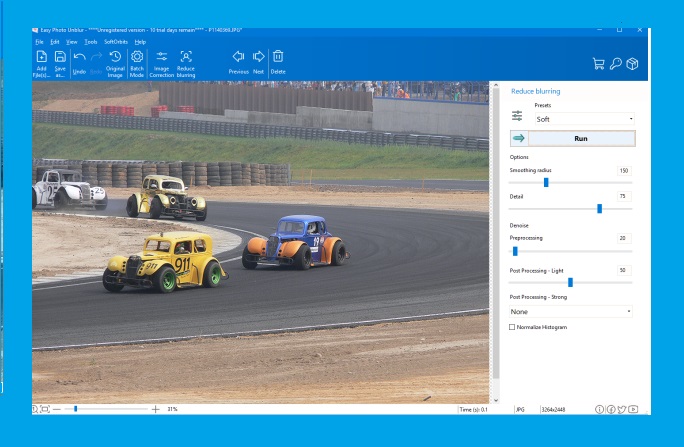
SoftOrbits markets Easy Photo Unblur as a tool that produces dramatic results with minimal artifacts. It is priced between 14.99 and 49.99 US dollars depending on the edition, making it the most affordable option in this comparison. Its main strengths include batch processing of multiple images, a wide selection of AI models (AI, Light, Gentle, Soft, Medium, Strong), denoise settings, and additional post-processing options. It also offers several ways to compare before-and-after results.
That said, the abundance of model options can be a double-edged sword. Beginners may find themselves cycling through multiple presets before landing on the right one, and the interface, while functional, is not as streamlined as some competitors.
Second Competitor: Luminar Neo Super Sharp AI
The second competitor is Luminar Neo Super Sharp AI, which promises naturally crisp results. As of this writing, Luminar Neo costs 199 US dollars, which includes the base application and all seven extensions, Super Sharp AI among them. If you only want the Super Sharp plugin, it is available separately for 50 US dollars. It is worth noting that the higher price reflects a full editing suite, not just a single-purpose sharpening tool, so direct price comparisons should be made with that context in mind.
To use Super Sharp AI, you install the plugin and navigate to its dedicated section, where you can choose between Universal and Motion Blur models and select Low, Medium, or High intensity. In testing, the Motion Blur setting generally produced the more noticeable improvements regardless of the actual cause of the blur. The integration with Luminar Neo’s broader editing ecosystem is a genuine advantage for photographers who want sharpening as part of a larger workflow.
Third Competitor: ON1 Tack Sharp AI
The third competitor is ON1 Tack Sharp AI. It ships as part of ON1 Photo RAW 2023, which costs 80 US dollars as of this writing. ON1 describes Tack Sharp AI as a state-of-the-art de-blurring feature capable of detecting and reducing both motion blur and camera shake.
Using it is straightforward: navigate to the noise and sharpening section, click the Tack Sharp AI tab, and a split view appears for before-and-after comparison. The tool comes with two sliders, though the blur slider defaults to maximum, so what you see on first preview is essentially the strongest correction available. ON1’s standout quality is speed; processing is nearly instantaneous with very little lag, making it the most responsive tool of the three.
The Results
So how did each tool perform?
SoftOrbits Easy Photo Unblur delivered the most visually striking improvements across the test images. Whether dealing with motion blur, out-of-focus shots, or generally soft images, its corrections were the most prominent of the three. The sharpening appeared natural and detailed, particularly on motion-blurred subjects. However, it is important to note that aggressive sharpening can sometimes introduce subtle artifacts on certain image types, and results may vary depending on the severity of the original blur.
Luminar Neo Super Sharp AI earned a strong second-place showing. Its face-enhancement technology proved genuinely effective at recovering facial detail, and overall sharpening was noticeably better than ON1’s. In several test images, Luminar’s results came close to matching SoftOrbits, especially on portraits. Its motion blur correction also showed clear improvement. For photographers already invested in the Luminar Neo ecosystem, Super Sharp AI adds considerable value without requiring a separate application.
ON1 Tack Sharp AI finished third in terms of sharpening quality, but it would be unfair to dismiss it entirely. Its processing speed was the best of the group by a wide margin, and its simple two-slider interface makes it the most accessible option for quick corrections. ON1 performed best on static subjects such as buildings and monuments, where its sharpening was more distinctive. However, the improvements on faces and heavily blurred images were minimal compared to the other two tools. For users who prioritize speed and simplicity over maximum sharpening power, ON1 remains a viable choice, especially as part of the broader Photo RAW package.
Also Read: Top AI Tools for Streamlining Social Media Content Creation
Final Thoughts
Each of these tools occupies a slightly different niche. SoftOrbits offers the strongest raw sharpening at the lowest price point, but asks you to navigate more settings to get there. Luminar Neo provides a well-rounded editing environment with solid sharpening that suits photographers who want an all-in-one solution. ON1 trades peak sharpening performance for speed and ease of use within a capable RAW editor. The right choice depends on your priorities: maximum correction, workflow integration, or fast and simple operation.
