

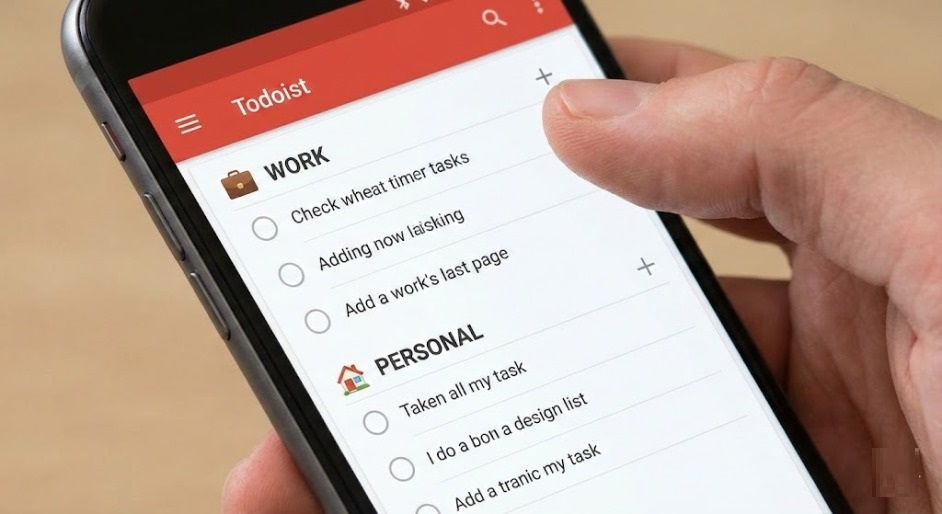
Struggling to separate work and personal life? You’re not alone. Remote work has blurred every boundary, leading to burnout and missed personal commitments. The fix doesn’t require a complicated system. Todoist, a free task management app trusted by millions, lets you organize work and life in one place—without them colliding. Here’s exactly how to use Todoist to reclaim your time and boost productivity.
Why Separating Work and Personal Life Matters
Prior to exploring the practical methods, it is essential to grasp the underlying rationale. When work tasks constantly invade your personal time, your brain never truly switches off. Studies consistently show that poor work-life balance leads to increased stress, anxiety, reduced productivity, and even physical health issues. You end up working longer hours but accomplishing less, because mental fatigue chips away at your focus and creativity.
Setting clear boundaries between professional responsibilities and personal time isn’t a luxury—it’s essential for mental health and productivity. The challenge is finding a system that makes maintaining those boundaries effortless, not another source of stress.
Why Todoist Is the Perfect Free Tool for the Job
Trusted by over 47 million people worldwide, Todoist is a free task management app designed to handle both work and life in one clean interface—without them colliding. Unlike a basic to do list app that simply lets you jot down tasks, Todoist lets you create completely separate workspaces for professional and personal tasks. You can filter your view to show only work tasks during office hours and only personal tasks when you’re off the clock. No more scrolling past client deadlines while trying to plan your weekend.
The app is available across every platform—iPhone, Android, desktop, web browser, and even smartwatches—so everything stays synced in real time no matter which device you pick up. And the free plan is genuinely generous, offering projects, labels, priorities, and collaboration features without requiring a credit card.
How to Set Up Todoist to Separate Work and Life
Here’s a step-by-step setup that takes less than ten minutes and will transform how you manage your daily tasks:
1. Create Separate Projects for Work and Personal
After downloading Todoist, create distinct projects for each area of your life. For example, set up “Work – Client Projects,” “Work – Admin,” “Personal – Health,” “Personal – Home,” and “Personal – Finance.” This physical separation inside the app mirrors the mental separation you want to build in real life. Every task you add goes into the right bucket from the start, so nothing crosses the line uninvited. Think of each project as a dedicated todo list for a specific area of your life, keeping everything organized and distraction-free.
2. Use Filters to Control What You See and When
Todoist’s filter feature is the real game-changer for work-life separation. Create a custom filter that shows only work-related projects and pin it to your favorites for weekday mornings. Then create a “Personal Only” filter for evenings and weekends. When you open the app after hours, you see your grocery list and gym reminders—not tomorrow’s meeting prep. This small visual boundary has a powerful psychological effect: it signals to your brain that work is done for the day.
3. Set Priorities and Due Dates Intentionally
Todoist offers four priority levels (P1 through P4) that let you instantly see what’s urgent versus what can wait. Assign due dates using natural language—just type “submit report Friday at 3pm” or “call dentist next Monday” and the app schedules it automatically. The Today view then gives you a focused, clutter-free list of only what needs your attention right now, preventing that overwhelming feeling of staring at an endless backlog.
4. Leverage Recurring Tasks for Routine Boundaries
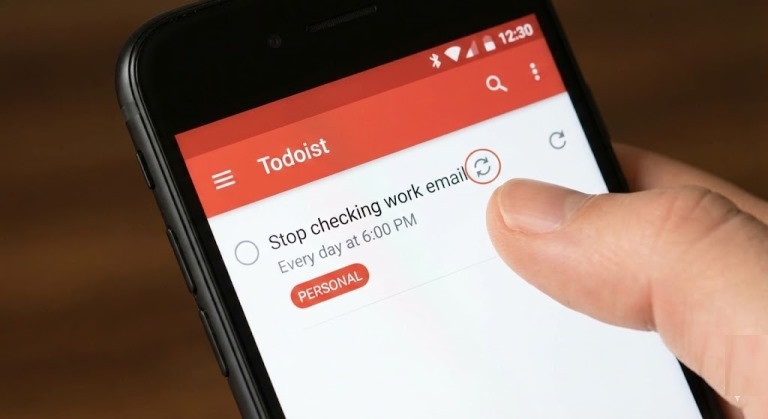
One of the most underrated features for improving productivity and maintaining boundaries is recurring tasks. Set a daily recurring task like “Stop checking work email” at 6:00 PM or “Weekly personal review” every Sunday morning. These gentle nudges train you to build consistent habits around disconnecting from work and being present in your personal life. Over time, these routines become automatic.
5. Sync with Your Calendar and Other Tools
Todoist integrates with over 100 tools including Google Calendar, Outlook, Slack, and Gmail. Sync your work tasks to your work calendar and personal tasks to your personal calendar. This creates a unified but compartmentalized view of your day. You always know what’s coming next without the two worlds bleeding into each other. The calendar integration also lets you time-block your day, allocating dedicated slots for focused work, personal errands, and genuine downtime.
Bonus Tips for Better Work-Life Balance
Turn off work app notifications after hours. Combine Todoist’s filter system with your phone’s Focus Mode or Do Not Disturb schedule to create a true digital boundary.
Do a weekly review. Every Sunday, spend five minutes reviewing what you accomplished and planning the week ahead. Todoist’s Upcoming view makes this effortless.
Try the Pomodoro Technique for deep work sessions. Pair your Todoist workflow with the pomodoro method—25 minutes of focused work followed by a 5-minute break—to power through your task list without burning out. This time-boxing approach complements Todoist’s priority system perfectly and helps you stay productive without overworking.
Share personal projects with family. Use Todoist’s free collaboration feature to share grocery lists, chore schedules, or vacation planning with your partner or family members.
Track your streaks. Todoist’s built-in productivity tracking (Karma) rewards you for completing tasks consistently, keeping you motivated to maintain your new boundaries.
Also Read: Icons8 Icons for App Builders: A Practical, Code‑First Review
Final Thoughts
Achieving real work-life balance isn’t about working less—it’s about working smarter and protecting the time that belongs to you. With Todoist, you get a single, free app that organizes every responsibility in your life while keeping work and personal tasks in their own lanes. No more 11 PM anxiety scrolling through tomorrow’s deadlines. No more forgetting your kid’s dentist appointment because it was buried under project notes.
The setup takes minutes, but the impact lasts. Start by creating your projects, setting your filters, and committing to one simple rule: when the workday ends, switch to your personal view and truly be present. Your productivity, relationships, and mental health will thank you for it.
