


A snapseed qr code is a quick way to apply a ready-made photo edit without changing every slider manually. It works like Snapseed presets, but the edit is shared through a visual code. For bloggers, creators, shop owners, and everyday users, snapseed qr code photo editing saves time while keeping control in your hands.
The key idea is simple: a snapseed qr code is a starting style, not a final rule. You scan it, apply it, then adjust the photo for light, subject, and mood. Used correctly, snapseed qr codes help you create cleaner and more consistent images fast.
What Is a Snapseed QR Code?

A snapseed qr code is a scannable edit preset made inside the photo editing app. It can store global changes such as brightness, contrast, curves, tone, detail, and color balance. The feature is connected with QR Looks, which lets users reuse and share edits in the Snapseed app.
A snapseed code removes guesswork because you do not need to copy each editing step. You scan one code and get a complete look. Still, every image is different, so even a strong snapseed qr code may need small manual corrections.
How to Use It Fast
Open a clear photo in Snapseed. Go to the QR option, choose scan QR code, and scan the preset. When the edit appears, compare before and after. This is where qr code snapseed editing becomes useful: you get speed first, then improve the final look with small changes.
If the image is too dark, raise brightness. If skin looks too warm, reduce warmth. If grass or sky looks fake, lower saturation. A good snapseed qr code should improve the image, not make it look over-edited.
Why Snapseed QR Codes Help Creators
snapseed qr codes are useful when you want a consistent style across many images. Bloggers can keep featured photos clean. Small businesses can improve product pictures. Social media users can make posts look more planned. This makes snapseed qr code photo editing a practical choice for fast mobile photo editing.
The biggest benefit of a snapseed qr code is speed with flexibility. You are not forced to accept the preset exactly as it appears. Treat snapseed qr codes as shortcuts, then fine-tune exposure, contrast, and detail.
How to Choose the Right Code
Choose snapseed qr codes according to the photo type. For faces, use soft contrast and natural color for better portrait editing. For travel, use balanced detail. For street photos, a light cinematic filter style can work well. For products, avoid heavy shadows and keep the edit bright.
A snapseed qr code made for sunsets may not suit indoor photos. A dark urban preset may not fit a wedding picture. This is why qr code snapseed users should test more than one look before saving. The right snapseed qr code should support the photo, not fight it.
Tips for Better Results
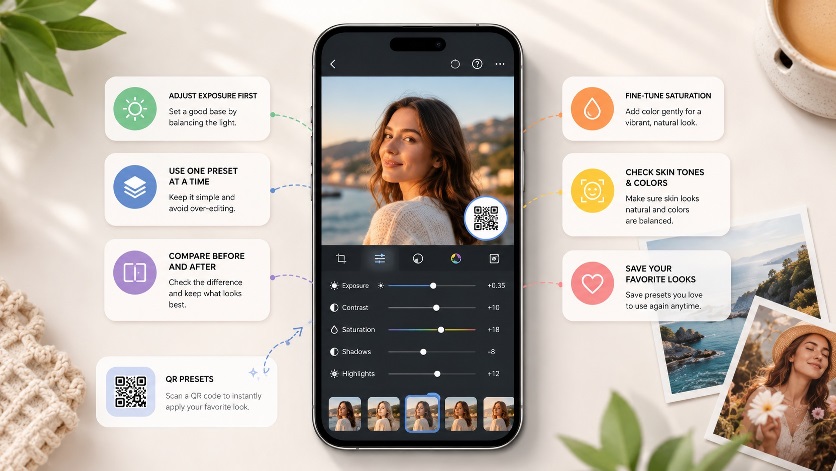
Use one snapseed qr code at a time. Stacking many snapseed qr codes can create harsh colors, crushed shadows, and rough detail. If the photo already has strong contrast, choose a softer preset. If it looks flat, choose a preset with more structure.
Study snapseed qr codes to improve your own editing skills. Apply one, check what changed, then notice how brightness, curves, warmth, and sharpness affect the image. Later, use create QR look to save your own style and build photo editing presets for repeat use.
Another smart qr code snapseed tip is to correct exposure before scanning. If a photo is too dark or too bright, fix that first. Then apply the snapseed qr code for a cleaner result.
Also Read: How to Create AI-Generated QR Code Art: Step by Step
Common Mistakes to Avoid
Do not apply a snapseed qr code and export without checking. Do not use snapseed qr codes only because they are popular. Avoid orange skin, oversharp backgrounds, and blocked shadows. A clean snapseed code should improve the photo while keeping it believable.
Also remember that snapseed qr code photo editing works best when the original image is decent. A blurry or poorly lit photo still needs basic correction. With the right image and the right snapseed qr code, you can create a polished edit quickly.
Final Thoughts
A snapseed qr code is one of the easiest tools for fast editing, but better results come from smart adjustments. Choose suitable snapseed qr codes, apply them carefully, and make small corrections before exporting. With practice, qr code snapseed editing can help you build a consistent photo style without complicated steps.
For daily editing, save your favorite snapseed qr code and organize trusted snapseed qr codes by use case. A simple snapseed qr code library can make future edits faster.
FAQs
What is a Snapseed QR code?
A snapseed qr code is a scannable preset that applies saved editing settings to a photo.
Are Snapseed QR codes good for beginners?
Yes. snapseed qr codes help beginners apply better edits quickly and learn useful styles.
Can I edit after scanning?
Yes. After qr code snapseed scanning, you can still adjust light, color, and sharpness.
Do all QR codes suit every photo?
In reality, a Snapseed QR code delivers the finest results only when it aligns seamlessly with the lighting, subject matter, and overall vibe of the image.
